Technology is changing rapidly, and companies that are dependent on legacy .NET applications can be slow to keep pace. These are the older systems that were constructed on the .NET Framework and are closely coupled with Windows servers, which are expensive to maintain, hard to scale, and not suitable for current AI workloads.
The process of migrating to an AI-ready cloud environment is not just a technical upgrade but a strategic decision that will allow the organization to be innovative, scale, and gain a competitive edge. In this blog, we will discuss five steps to migrate legacy systems. Applications to the cloud, making them prepared to incorporate AI capabilities. Partnering with a trusted .NET development company or ASP.NET development company can make this journey smoother.
Legacy applications may still “work,” but they come with hidden costs:
By migrating to the cloud and modernizing to .NET versions, businesses can:
A lot of organizations are dependent on .NET development services to make sure that it is migrated according to business objectives.
Migration starts with knowing what you possess. In the absence of a clear evaluation, you may miss important dependencies.
Key Actions
Example: A banking system based on Windows Communication Foundation (WCF) may be used in .NET Framework 4.5. Since WCF is not supported in .NET Core, it should be migrated to RESTful APIs.
Legacy Windows is the only platform that supports .NET Framework apps. Modern .NET Core and .NET 6/7 are cross‑platform, cloud‑friendly, and optimized for performance.
Key Actions
Real-life application: A healthcare IT vendor has upgraded its patient management system from .NET Framework to .NET 6. This enabled it to be deployed on Linux servers in the cloud, which lowered the cost of hosting and enhanced performance. Partnering with a .NET Core development company or an ASP.NET Core development company can accelerate this process.
The choice of the appropriate cloud provider is essential to AI integration.
Options
Considerations
Case Study: A FinTech company decided to use Azure because of its easy integration with .NET and AI services, which allow detecting fraud with the help of machine learning models. A lot of companies refer to the Microsoft .NET development company to facilitate easy adoption.
Legacy applications are usually monolithic, i.e., all the features are combined. This makes scaling and updating difficult. Cloud migration is the perfect time to modernize.
Key Actions
Real-life application: A learning platform has migrated its monolithic .NET application to microservices. This allowed personalization based on AI, which customized learning experiences according to student patterns. A skilled .NET application development company can guide this transformation.
After making your app cloud-ready, you can add AI capabilities to make it more functional.
AI Integration Ideas
Example: A retail company implemented AI-based recommendation engines into its migrated .NET e‑commerce platform, boosting sales by 25%. Many organizations hire .NET developers to implement these AI features effectively.
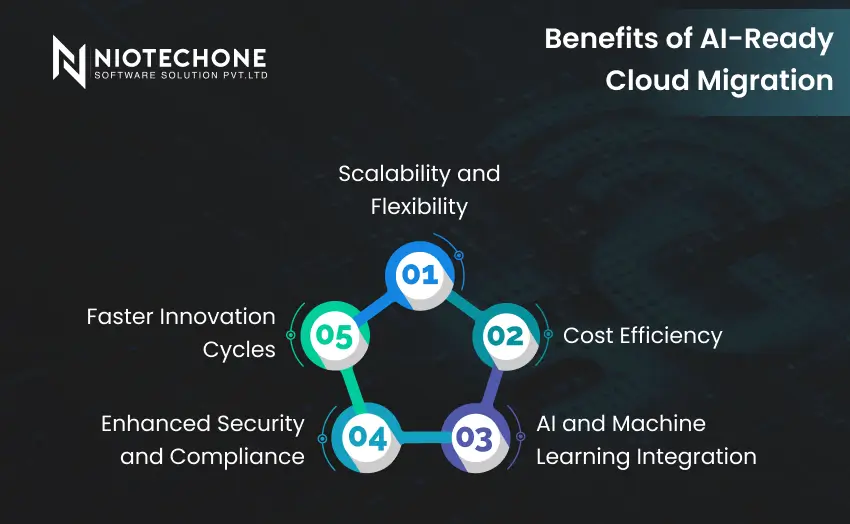
Migrating legacy .NET applications to an AI-ready cloud environment is not merely a question of modernization, but a question of new opportunities to grow, be efficient, and innovative.
Scalability and Flexibility
Cloud services enable you to scale resources on demand. Seasonal businesses are able to cope with traffic spikes, startups can scale to a global scale, and developers can experiment without hardware constraints.
Cost Efficiency
The pay-as-you-go model does not require huge initial investments. Companies save on hardware, lessen their IT workload, and have predictable monthly expenses.
AI and Machine Learning Integration
Cloud providers have in-built AI services:
This simplifies the process of adding fraud detection, chatbots, or recommendation engines.
Enhanced Security and Compliance
Cloud platforms provide:
Faster Innovation Cycles
CI/CD pipelines enable developers to release updates rapidly, reducing release cycles and reacting more rapidly to market changes.
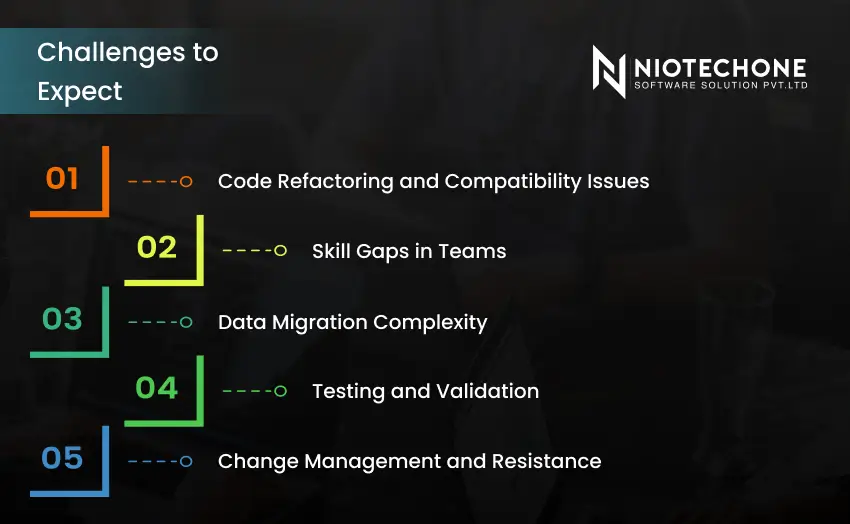
Although the advantages are strong, there are challenges associated with migration.
Code Refactoring and Compatibility Issues
Older applications can be based on old APIs or libraries. WCF services, such as, should be substituted with RESTful APIs. This needs to be planned and tested.
Skill Gaps in Teams
The use of clouds and AI necessitates new skills. Training may be required in teams:
Data Migration Complexity
The most difficult part is often the transfer of large databases in a secure manner. Sensitive information should be in accordance with privacy laws, and downtime should be reduced.
Testing and Validation
Applications should be well tested after migration:
Skipping this step can be very expensive.
Change Management and Resistance
Migration may be opposed by employees and stakeholders. Resistance can be overcome by clear communication, phased rollouts, and training.
Migrating legacy .NET applications to an AI‑ready cloud is not just a technical upgrade — it’s a business transformation. Organizations can achieve scalability, innovation, and competitive advantage by adhering to these five steps: Assess, Upgrade, Choose Cloud, Modernize, and Integrate AI.
The process might appear complicated, yet with the proper plan, equipment, and the assistance of a professional .NET development company or ASP.NET Core development company, businesses can be sure that they are going into the future of AI-driven applications.
Migration reduces costs, improves scalability, and enables AI integration for smarter applications.
Not efficiently. Upgrading to .NET Core or .NET 6/7 ensures cross‑platform and cloud‑native support.
Microsoft Azure is the most seamless choice, but AWS and Google Cloud also support .NET workloads.
AI adds features like predictive analytics, chatbots, and personalization, enhancing user experience and business value.
Refactoring legacy code and dependencies is often the most time‑consuming step.
3rd Floor, Aval Complex, University Road, above Balaji Super Market, Panchayat Nagar Chowk, Indira Circle, Rajkot, Gujarat 360005.
Abbotsford, BC
15th B Street 103, al Otaiba Dubai DU 00000, United Arab Emirates
3rd Floor, Aval Complex, University Road, above Balaji Super Market, Panchayat Nagar Chowk, Indira Circle, Rajkot, Gujarat 360005.
Abbotsford, BC
15th B Street 103, al Otaiba Dubai DU 00000, United Arab Emirates
Copyright © 2026 Niotechone Software Solution Pvt. Ltd. All Rights Reserved.