How to Use .NET Aspire for Observability in Microservice App

Introduction

Teams working with ASP.NET Development are using Aspire to make monitoring simpler in distributed applications. Instead of jumping between different tools, developers can track logs, traces, requests, and service activity in one place. 

Businesses providing ASP.NET Services also use it when building cloud-based systems and microservice applications. A modern ASP.NET Application usually depends on several connected services if one part stops working properly.

Diagram illustrating observability in microservices with logs, metrics, traces, and monitoring components connected across distributed systems.

What is Observability in Microservices?

Observability allows developers to gain insights into the internal state of an application through logs, metrics, traces, events, and performance data. For microservice architecture, it is crucial to identify problems in various interconnected services.

Modern .NET Application Observability is crucial for enabling better monitoring, debugging, and system reliability in distributed environments.

What is .NET Aspire?

.NET Aspire is a cloud-ready stack for creating observable and distributed .NET applications. It provides features like service orchestration, OpenTelemetry integration, monitoring dashboards, and distributed tracing.

Businesses using Aspire can help enhance application visibility and performance, and make managing microservices easier for .NET Core services. 

Key Features of .NET Aspire for Observability

Feature

Benefit

Distributed Tracing

Tracks requests across multiple services

Centralized Logging

Simplifies debugging and issue tracking

Metrics Monitoring

Measures application performance

OpenTelemetry Support

Standardized observability integration

Service Dashboard

Provides real-time application visibility

Health Checks

Detects service failures quickly

These features make .NET Aspire highly beneficial for enterprise-level ASP.NET applications.

Why Observability Matters in Microservices

Microservices architecture consists of multiple independent services communicating with each other, which can make troubleshooting difficult when issues occur. Observability helps businesses improve application reliability by providing better visibility into system behavior and service interactions.

With proper observability tools, teams can detect issues faster, reduce downtime, monitor service dependencies, optimize performance, and deliver a better customer experience. This is why modern .NET Core developers rely heavily on observability practices to manage complex distributed applications more effectively.

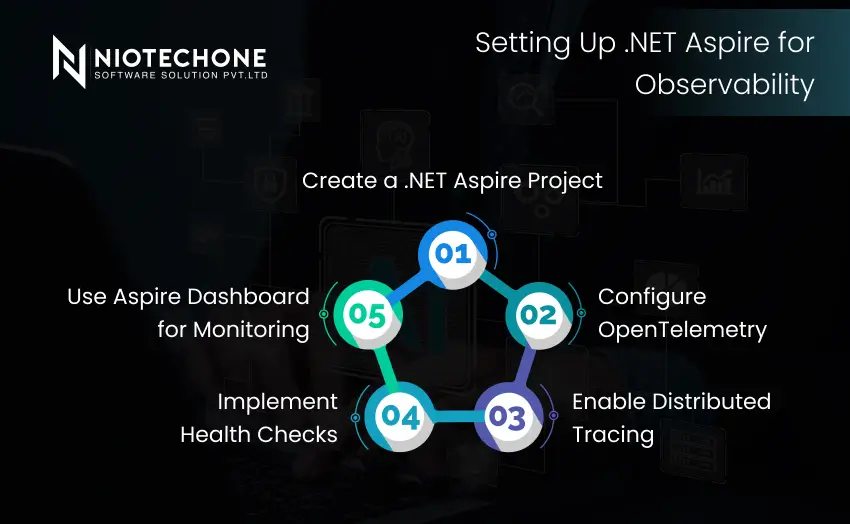
Five-step process for configuring .NET Aspire observability, including project creation, OpenTelemetry setup, distributed tracing, health checks, and dashboard monitoring.

Setting Up .NET Aspire for Observability

1. Create a .NET Aspire Project

The first step is creating a .NET Aspire solution using Visual Studio or the .NET CLI.

A typical Aspire solution includes:

  • App Host Project
  • Service Projects
  • Shared Configuration
  • Monitoring Components


This setup simplifies microservice orchestration for ASP.NET Services.

2. Configure OpenTelemetry

OpenTelemetry is one of the core technologies used in .NET Aspire observability.

It helps collect:

  • Logs
  • Metrics
  • Traces


Developers can configure
OpenTelemetry in the application startup configuration.

3. Enable Distributed Tracing

Distributed tracing helps developers track requests as they move between microservices.

For example:

  • API Gateway → Authentication Service → Payment Service → Database


With distributed tracing, developers can identify:

  • Slow requests
  • Failed transactions
  • Service bottlenecks
  • Dependency issues


This is extremely useful for large-scale ASP.NET Application architectures.

Example of Observability Workflow

Step

Action

Request Received

User sends API request

Trace Generated

Request trace ID created

Service Communication

Request moves across services

Metrics Collected

Performance data recorded

Logs Captured

Events and errors stored

Dashboard Updated

Real-time monitoring displayed

This workflow helps .NET Core Developers quickly identify application issues.

4. Use Aspire Dashboard for Monitoring

One of the most powerful features of .NET Aspire is its built-in dashboard.

The dashboard provides real-time visibility into:

  • Application health
  • Running services
  • Logs
  • Traces
  • Metrics
  • Service dependencies


This centralized monitoring system simplifies microservice management for businesses using .NET Core Services.

5. Implement Health Checks

Health checks allow developers to monitor service availability and system health.

Examples include:

  • Database connectivity checks
  • API availability checks
  • Cache server monitoring
  • External service monitoring


Health checks help businesses prevent downtime and maintain application reliability.

Benefits of Using .NET Aspire for Observability

  • Improved Application Monitoring: Monitoring is less disjointed, with most of the important information more easily accessible with Aspire.
  • Faster Issue Detection: The most difficult part of a problem in a microservice application is usually determining the origin of the problem. 
  • Better Performance Optimization: Not all applications are slowed down due to the entire system. 
  • Simplified Microservice Management: Although microservices can be beneficial, managing everything manually becomes hard as the project grows. 
  • Enhanced Developer Productivity: There’s no need to add to developers’ workloads. 

Best Practices for Using .NET Aspire

Use Structured Logging: Later on, when logs are properly structured, they are much easier to understand. 

Monitor Key Metrics: Regularly monitor response time, CPU usage, memory usage, and failed requests. 

Enable Real-Time Alerts: Alerts assist teams in responding promptly when a service suddenly crashes or performance decreases. 

Use Distributed Tracing Everywhere: When the tracing request is followed across all services, it will provide a better idea of how the application functions. 

Regularly Review Dashboards: Many teams only get to open a dashboard when something goes wrong. 

Why Businesses Should Adopt .NET Aspire

As applications expand, businesses typically require more monitoring and observability capabilities with microservices.

.NET Aspire can assist organisations:

  • Construct more resilient applications
  • Improve daily operations
  • Reduce downtime
  • Improve user experience
  • Simplify cloud-native development


Businesses that are investing in ASP.NET Development. Observability tools such as Aspire can be used with .NET Core Development to enhance scalability and application performance.

Conclusion

A properly monitored .NET Core Application is usually easier to maintain because issues can be identified earlier before they affect users too much.

For many hiring .NET Core Developers, Aspire is becoming useful while building modern microservice and cloud-based applications. With current .NET Core Trends moving more toward distributed systems, tools focused on observability are becoming part of regular development workflows rather than something optional.

Frequently Asked Questions FAQs

.NET Aspire is a cloud-ready stack for building observable and distributed .NET applications.

Observability helps monitor application performance, logs, traces, and service health.

Yes, .NET Aspire includes built-in OpenTelemetry integration for monitoring and tracing.

Yes, businesses using ASP.NET Services and .NET Core Services can use Aspire for scalable enterprise applications.

Developers building cloud-native and microservice-based ASP.NET applications or .NET Core applications should use Aspire.