Blazor WebAssembly vs Blazor Server: Which to Pick in 2026?

Introduction

Blazor has transformed web development in the .NET world by enabling developers to create interactive applications using C#. As we move into 2026, a key question is: Blazor WebAssembly (WASM) or Blazor Server?

Each approach has its pros and cons. This blog will explore the differences, use cases, and how to choose the right one for your project. For companies working with a .NET development company or hiring .NET developers, this choice is especially important.

What is Blazor Server?

Blazor Server runs application logic on the server. The server and browser are connected via a real-time SignalR connection.

Key Features

  • Quick load time: Small download as most of the work is done on the server.
  • High security: Data remains on the server.
  • Always connected: Requires internet for every action.
  • Scalability issues: Every user session uses server resources.


Real-World Applications

  • Business Dashboards: Businesses may need dashboards to display real-time financial or operational data. Blazor Server handles data on the server, keeping sensitive data secure. For example, a bank’s dashboard can show real-time transactions without exposing sensitive data to the browser.
  • Healthcare Portals: Medical institutions are bound by regulations such as HIPAA. Blazor Server stores patient data, lab results, and medical history on the server, avoiding data leaks. Doctors can get real-time data securely.
  • Internal Business Apps: Companies can build HR apps, inventory management, or employee portals that are only accessible from the corporate network. These apps are used in a secure environment with a fast internet connection, so Blazor Server is cost-effective. Many ASP.NET development companies use this model for internal enterprise solutions.
Illustration of Blazor WebAssembly development showing browser-based .NET execution with WebAssembly technology and frontend application code.

What is Blazor WebAssembly?

Blazor WebAssembly is a client-side framework using WebAssembly. The .NET runtime and app are downloaded to the client.

Key Features

  • Offline support: Works without a constant server connection.
  • Scalable: Less server load as processing is done on the client.
  • Longer load time: Bigger download than Blazor Server.
  • API security required: Sensitive logic must be protected.


Real-World Applications

  • Progressive Web Apps (PWAs): Imagine an e-commerce app that lets users browse products, add items to their cart, and even complete transactions offline. Blazor WebAssembly enables this by running code in the browser and syncing data once the internet is restored.
  • Customer Portals: Businesses with a large number of customers, like travel agencies or online learning platforms, can use WebAssembly. Since most of the processing is done on the client, the server is not overwhelmed, which improves scalability.
  • Educational Platforms: Students often have poor internet connections. Blazor WebAssembly allows educational applications to run offline, so students can read lessons, complete quizzes, and save their progress until they are connected again. This makes education accessible and reliable. ASP.NET Core development company use WebAssembly for modern, scalable education apps.

Comparison of Blazor Server vs Blazor WebAssembly

Feature

Blazor Server

Blazor WebAssembly

Execution

Server-side

Client-side

Performance

Fast initial load

Slower initial load, smoother after load

Scalability

Limited by server resources

Highly scalable, client-driven

Offline Support

Not supported

Supported

Security

Strong (server-controlled)

Requires API hardening

Network Dependency

Constant connection required

Works offline

Choosing the Right Model in 2026

To choose between Blazor Server and Blazor WebAssembly, consider the size, user base, network and security needs of your project:

Project Size:  

Blazor Server is ideal for small internal apps (such as HR systems or inventory management) that don’t require offline capabilities and can leverage secure server-side processing. Large apps (such as e-commerce sites or online courses) are better off with Blazor WebAssembly, which can support thousands of users without straining the servers.

User Base: 

If you’re building an app for thousands or millions of users, Blazor WebAssembly is more economical. It offloads work to the client, minimising server load and costs.

Connectivity:  

WebAssembly excels in areas with poor connectivity. It enables offline operation and data synchronization, which is perfect for customer-facing apps or educational software.

Security Needs:  

For apps that handle sensitive data, such as medical or financial apps, Blazor Server is recommended. With all processing on the server, data is never exposed to the browser.

Hybrid Approach in 2026

Modern .NET frameworks support hybrid rendering, allowing you to use both approaches in the same app:

  • Use Blazor Server for secure admin dashboards where data needs to stay on the server.
  • Use Blazor WebAssembly for public-facing components that need to scale and work offline.


This hybrid approach makes Blazor more versatile than ever, offering the best of both worlds. For businesses partnering with a Microsoft .NET development company, hybrid adoption is becoming a popular strategy.

Real-World Case Studies

Case Study 1: FinTech Loan Processing System  

A FinTech firm converted its loan processing dashboard to Blazor Server. Financial data is sensitive, so all logic remained on the server for security and compliance. The real-time nature of the updates enabled quicker decision-making, enhancing customer experience.

Case Study 2: E-Commerce Platform  

A medium-sized e-commerce business used Blazor WebAssembly for its customer portal. Users could view products, add to cart, and shop offline. When the connection was restored, the app automatically updated. This enhanced the user experience, saved on server expenses, and enabled the company to scale rapidly during peak seasons.

Case Study 3: Healthcare IT Portal  

A medical company used Blazor Server to meet HIPAA standards. No patient data, lab reports, or prescriptions were stored on the server. Real-time data was available to doctors without compromising security, making it efficient. Many .NET Core development companies showcase this approach for healthcare IT.

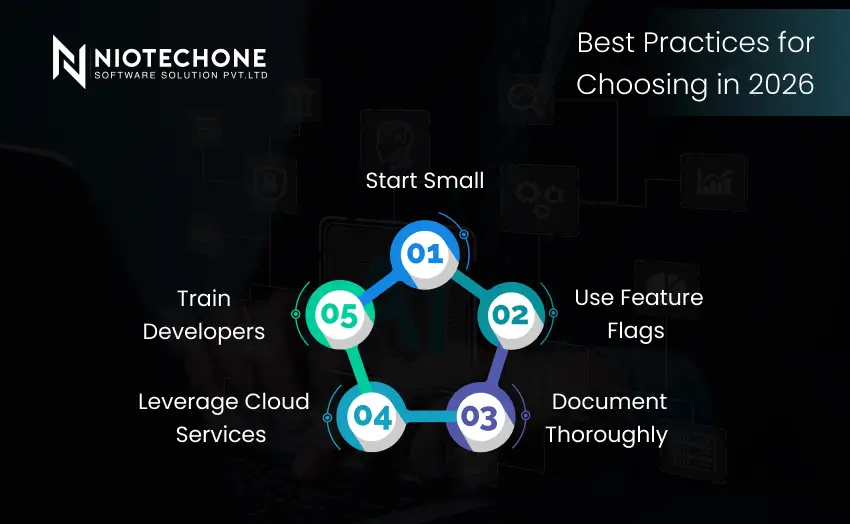
Infographic showing best practices for choosing technology in 2026, featuring a circular five-step process with points such as Start Small, Use Feature Flags, Document Thoroughly, Leverage Cloud Services, and Train Developers.

Best Practices for Choosing in 2026

Start Small  

Start with a small project with a single hosting model. This allows you to test for performance and user experience problems.

Use Feature Flags  

Use feature flags to switch between server and client hosting. This enables a smooth transition and testing phase.

Document Thoroughly  

Documentation is crucial for model migration. It helps developers comprehend architectural choices, dependencies and migration procedures.

Leverage Cloud Services  

Services such as Azure App Service or Azure Kubernetes Service make deployment, scaling and monitoring easier. They also support hybrid hosting.

Train Developers  

Make sure your developers are familiar with Blazor Server and WebAssembly. This minimises the learning curve and allows developers to make better decisions when implementing the solution. Many businesses choose to hire .NET developers or work with an ASP.NET development company for easier integration.

Conclusion

By 2026, Blazor Server and Blazor WebAssembly will have their use cases.

  • Blazor Server: Secure, internal, data-sensitive apps.
  • Blazor WebAssembly: Suitable for scalable, offline-capable, public apps.
  • Hybrid approach: The best of both worlds, and often the best option.


Consider performance, scalability, security, and offline capabilities to choose the best model for your business. Working with a reliable
.NET application development company or ASP.NET Core development company guarantees future-proofing.

Frequently Asked Questions FAQs

Blazor Server loads faster initially, but Blazor WebAssembly offers smoother performance after the first load.

Yes, it supports offline mode and can be used as a Progressive Web App (PWA).

Yes, because all logic runs on the server and sensitive data never reaches the client.

Blazor WebAssembly is more scalable since it reduces server dependency.

Yes, modern .NET frameworks support hybrid rendering, allowing you to combine both models in one application.