Across the entire web, mobile applications, enterprise picks, marketing campaigns, and internal training, video content is providing the engagement, clarity, and emotion for storytelling that cannot be achieved with text or graphics. Historically, however, video production has been a resource-intensive process (scripting, filming, post-production, editing, voiceovers, motion graphics, etc.).
Now, the tide is shifting with AI video generation and creative automation technologies, which are rapidly lowering the barrier to creating videos and increasing the number of teams (even small teams) that will be able to produce polished and finished videos with little human involvement; simultaneously, development is here to stay. As these technologies mature, they are not only accelerating content pipelines, but shaping the companies that bring them to the market (a software company, a digital agency, even a .net developing company in Rajkot), their approach to storytelling, branding, and user engagement.
What AI video generators can do today?
AI video generation has made significant progress. Early systems were limited to producing simple animations or slideshows composed of static still images, while modern tools are capable of making compelling short clips from prompt requests, images, or scripts–including motion, audio, and various consistency. Among the things the tools are capable of include:Â
Text → Video: You can give the AI a script or description of a scene and the AI will create a video (with visual content, animations, a voice, and background audio).
Image → Animation: The AI takes static images (e.g., portrait images, assets) and turns them into animated motion or video.
Video → Transformation: The AI edits or restyles existing video (i.e., change background, style, or effects), or adds new elements to the video.
Avatar / Character generation: The AI uses digital avatars (human-like, cartoon or stylized) and the avatar narrating or presents.
Some modern models will even support audio generation or lip sync, and provide a better scene composition or consistency. One way to/best example of this is seen in Google’s Veo 3—a text-to-video model that generates audio.
Why should a .NET development company in Rajkot (or a software development company in Rajkot) worry about AI video generators? Because video is increasingly becoming a part of the digital product stack and marketing stack, and you can improve overall efficiency, engagement, and creativity by automating any aspect of video generation.Â
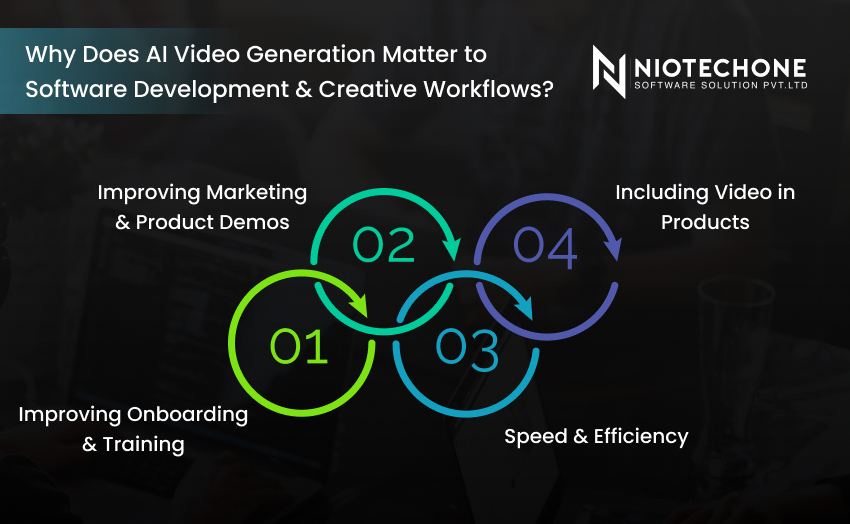
1. Improving Marketing & Product Demos
Software products today rely on a compelling visual narrative—explainer videos, feature showcases, walkthroughs, brand promotion teasers—and even product demos all visually convey the essence of what a product does. Generative AI allows for software development firms to create short polished video demos, without having to hire complete video production teams.
2. Improving Onboarding & Training
Marketing tooling or software, whether it be software or an API, requires documentation, tutorials, and/or training material to support it. AI video generation can create short explainer videos from release notes (amateur) or change logs, visually explaining the new functionality being added.  Â
3. Including Video in Products
In some applications, video content is part of the user experience that includes onboarding flows, help overlays, dynamic user stories, and automated video replies. AI Voice including video content is easy to accomplish using generative AI.
4. Speed & Efficiency
The process of producing video content is cumbersome and costly. Generative Video production can significantly reduce cost and legwork time—most users report producing post-ready content in less than 15 minutes using tools available today.Â
Here are practical applications whereby video generation is advantageous (especially in your field).
Use Case 1: Feature Demo & Release Videos
Whenever a newly created feature is released the dev team can use AI to produce a short demo video that includes, UI flows, animations, voice narration, that shows captions.
Use Case 2: Training / Onboarding Videos
Automatically generate internal or client training videos: “How to configure module X,” or “quick start guide.” This takes less time from the recording screen-casts.
Use Case 3: Customer Support & FAQ Videos
Instead of static text FAQs, AI can generate short videos answering questions. For example when the user opens a topic for help and FAQ auto-generates a 30sec video walk-through for their version of the product and their locale.
Use Case 4: Social Media & Content Marketing
It’s easy to generate content for social channels using AI including, teasers, clips, animated intros, etc. Development teams will be able to keep a steady stream of content without expensive video creators.
Like in all powerful areas AI video generation offers advantages and also challenges. As a dev or agency, you should understand the challenges and practice safely.Â
1. Quality / Coherence & Hallucinations
AI-generated visuals and narratives may display abnormalities or anomalies: strange transitions, awkward movements, changing light sources, flickering objects, or misalignment/inconsistency between audio and visuals. Output should always be evaluated and corrected, if necessary.
2. Absence of Domain Product Context
AI will not comprehend domain knowledge UI flows, business logic, or asset images. The video may be glossy but will misrepresent your product. This will involve custom prompts or injections of assets.
3. Legal / Copyright Issues
If AI models have legally trained on copyrighted content or assets the generated video may be infringing copyright. Additionally, the audio, music, avatars, etc. must be cleared, if applicable, so contracts with the client must include these associated risks.
4. Brand/Style Drift
Consistency is key as a brand. If AI generation, delivery, or flows are not delineated the generated video assets can drift away from the brand style—fonts, logos, colors, etc. Templates, style guides, etc. must be adopted and introduced into workflows.
If planning to deploy AI video generation in your professional development or creative setting (specifically the agency/firm practices associated with web development (HTML, CSS), .NET Core/ASP.NET Core or Azure), below are best practices:
1. Start with Templates / Controlled Workflow
Utilizing templates will help as a starting point: brand style, intro/outro, transitions or any modifications to resources. In a controlled shell, continue in AI to fill in content blocks (with “print screen”, narration, UI flows). This balance and mix aids in creativity and consistency.
2. Prompt Engineering and Context Enrichment
Provide context to AI, such as screenshots of your product, design guidelines, or specific tone guidelines. Use structured prompts. Supply video examples or previously produced assets to give AI a sense of style.Â
3. Human Overseeing and Iterative Refinement
There should be human reviewing of AI outputs. Refine it. Correct the mistakes. Use a new prompt, refine the visuals or adjust the narrative. Do not expect perfection on the first pass.
What does the future hold for video generation using AI, and how far will it be adopted into software and creative endeavors?Â
AI video generation and creative automation is not just a novelty, they are becoming practical tools that democratize video production. Software companies, dev agencies, and product teams can leverage these functionalities for innovative marketing uses, more effective training, richer product experience, and internal efficiencies.Â
As a contemporary software development organization based in Rajkot, particularly one that specializes in web development, .NET / ASP.NET Core, Azure, and enterprise mobility solutions in Rajkot, if you were to adopt AI video tools, it will provide you with a truly unique market appeal. It’s the software development experience PLUS visual storytelling, at a lower cost, quicker turnaround, and better overall product polish.
An AI video generator is basically an AI powered automated tool for generating videos from text, images, or even simple prompts. For example, rather than going through the manual editing process of creating a video clip, the AI only needs to analyze your script in order to create a video clip that is ready to use as-is.
AI video generators will be important in 2025 because they will allow businesses to create content faster, cheaper, and more at scale. As the demand for digital marketing, app demos, and online training continues to rise, creative automation will help your team save time in production hours.Â
AI video tools can ease content creation for software demos, feature showcases, and client training for a Rajkot company specializing in developing on the .NET framework. Rather than hiring a full team of video production professionals, they could use AI-generated videos to create polished and aesthetically pleasing videos explaining an application’s function or to showcasing the user interface flows.
Definitely. B2B companies often see the greatest value in these solutions. AI-generated videos can present sophisticated software product features, application program interface (API) capabilities or enterprise work flows in mundane and professional formats.
AI is not intended to replace humans—instead, it augments. While AI video tools may automate repetitive editing or to generate a video draft, a human is often needed to create context, evoke emotion, and provide direction on the storyline.
3rd Floor, Aval Complex, University Road, above Balaji Super Market, Panchayat Nagar Chowk, Indira Circle, Rajkot, Gujarat 360005.
Abbotsford, BC
15th B Street 103, al Otaiba Dubai DU 00000, United Arab Emirates
3rd Floor, Aval Complex, University Road, above Balaji Super Market, Panchayat Nagar Chowk, Indira Circle, Rajkot, Gujarat 360005.
Abbotsford, BC
15th B Street 103, al Otaiba Dubai DU 00000, United Arab Emirates
Copyright © 2026 Niotechone Software Solution Pvt. Ltd. All Rights Reserved.