WordPress General Setting

WordPress General Settings are basic configurations that control the main aspects of your website, such as the site title, tagline, URL, timezone, and language. These settings help define your site’s identity, manage how it appears to visitors, and ensure proper functionality across different regions and devices. Here, we’ll take you through each section of the General Settings in detail, providing best practices and tips to ensure your WordPress site is set up for success.

How to Access General Settings in WordPress

To access the General Settings, follow these steps:

Step 1: Login to Your WordPress Dashboard:

  • Go to your WordPress login page.
  • Enter your username and password.
  • Click Log In

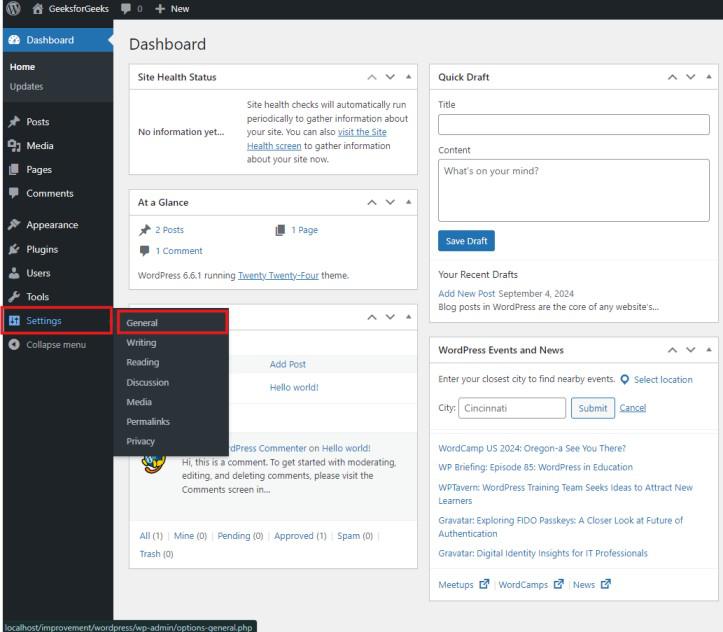
Step 2: Navigate to General Settings:

  • In the WordPress Dashboard, locate the Settings option in the left-hand menu.
  • Click on Settings, then select General from the dropdown.

Key General Settings Explained

1. Site Title and Tagline

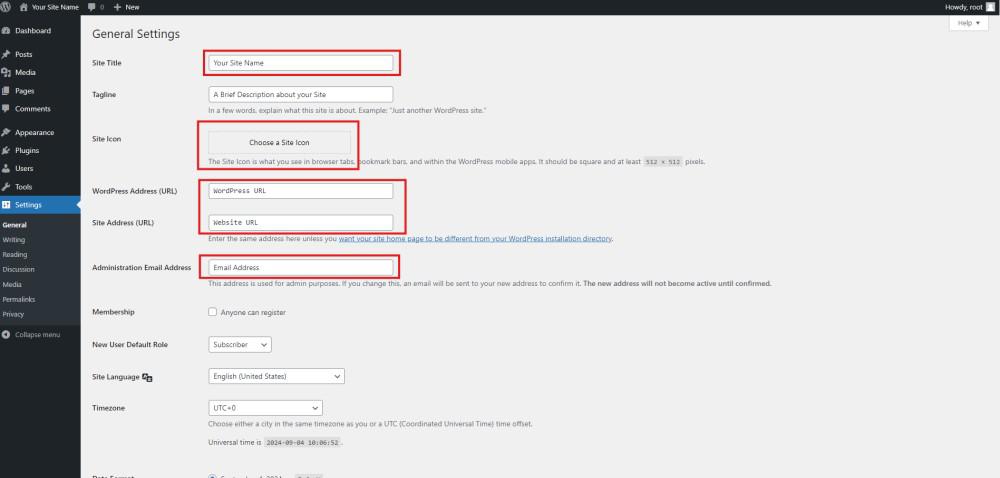
  • Site Title: This is the name of your website. It appears in the header of your site, browser tab titles, and in search engine results. Choose a descriptive, relevant title that reflects your brand or site’s purpose.
    • Best Practice: Include a primary keyword in your site title to enhance SEO. For example, if your site is about home gardening, a good title could be “Green Thumb Gardening: Tips and Tricks for Every Season”.
  • Tagline: A brief description or slogan that complements your site title. It appears alongside the site title in themes that support it.
    • Best Practice: Craft a concise tagline that captures the essence of your site. For example, “Your Go-To Resource for Home Gardening”.

2. WordPress Address (URL) and Site Address (URL)

These URLs are critical as they define where your WordPress files are located and where your site is accessible on the web.

  • WordPress Address (URL): The URL where your WordPress core files reside. This is usually the same as your Site Address unless you’re running WordPress from a subdirectory.
  • Site Address (URL): The URL your visitors will use to access your website.
    • Best Practice: Ensure both URLs are correct and consistent. A mismatch can lead to broken links or inaccessible content. Always use “https” for security and SEO benefits.

3. Email Address

  • Description: The administrative email address used for notifications about new users, updates, and site issues.
    • Best Practice: Use an active and monitored email address. Keeping this updated ensures you receive important alerts about your site’s performance and security.

Need Help With WordPress Developer?

Work with our skilled WordPress developers to accelerate your project and boost its performance.

Support On Demand!