Blog posts in WordPress are the core of any website’s content strategy, allowing you to share articles, updates, and multimedia content like text, images, videos, and links. Whether you share news, personal experiences, or expert advice, understanding how to add and manage posts in WordPress is important for growing your site’s audience.
Here, we will show you step-by-step instructions on how to create and publish posts in WordPress. By the end, you’ll know how to add, organize, and publish content on your WordPress site, ensuring it’s easy for readers to find and enjoy.
Adding posts to your WordPress site helps keep your content fresh, improves SEO, and engages your audience. By categorizing and tagging your posts, you also make your content easier for readers to navigate and for search engines to index, ultimately driving more traffic to your site.
When you add a blog post in WordPress, you can add a title, write the content, and format it using different styles. You can also add categories and tags to organize your posts and make them easier for readers to find. After adding a new post in WordPress, We will understand how can we publish this post or save it as a draft, so to add, a new post to your WordPress follow the below steps.
Step 1: Go to the WordPress login page and enter the username and password to log in to the WordPress Dashboard.
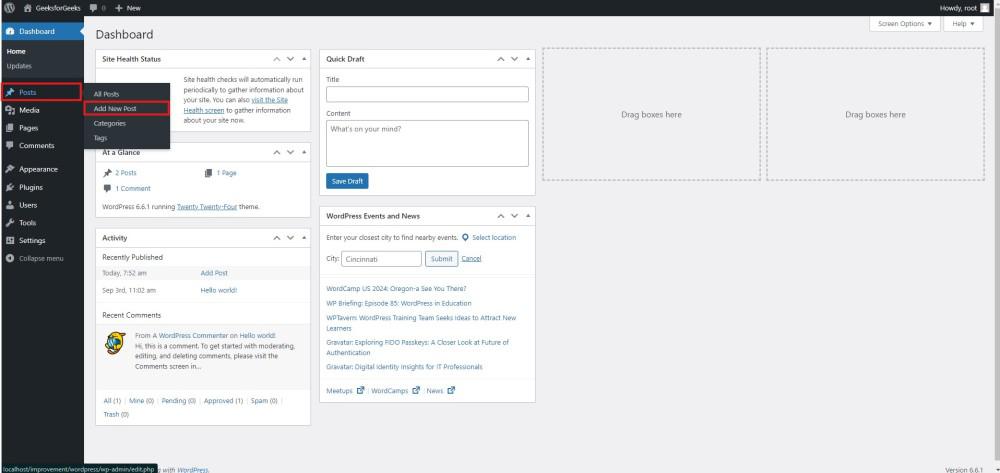
After successful login, your WordPress dashboard looks similar to this.
Step 2: Navigate to Add a New Post
To add a new blog post:
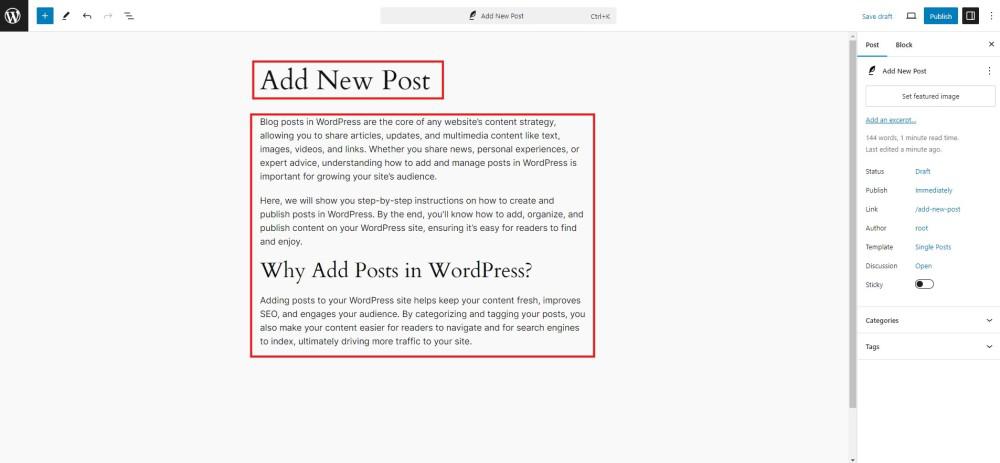
Step 3: Write Your Post
Now, you’ll see the post editor where you can start writing your content:
Step 4: Format and Organize Your Post
Before publishing, make sure to format and organize your post:
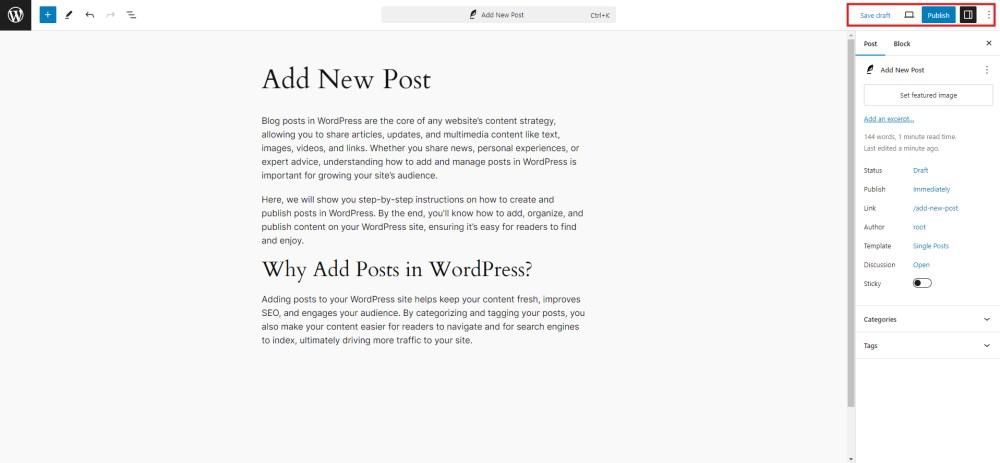
Step 5 : Save, Preview, or Publish Your Post
After writing your post, you have several options:
WordPress Add Posts is a straightforward process that allows you to efficiently create and manage content for your website. The user-friendly interface of the WordPress Dashboard simplifies the task, making it accessible for both beginners and experienced users. By following the stepwise guide outlined above, you can effortlessly navigate through the process of adding a new post, customizing its content, and deciding whether to save it as a draft or publish it for the world to see.
Work with our skilled WordPress developers to accelerate your project and boost its performance.
3rd Floor, Aval Complex, University Road, above Balaji Super Market, Panchayat Nagar Chowk, Indira Circle, Rajkot, Gujarat 360005.
Abbotsford, BC
15th B Street 103, al Otaiba Dubai DU 00000, United Arab Emirates
3rd Floor, Aval Complex, University Road, above Balaji Super Market, Panchayat Nagar Chowk, Indira Circle, Rajkot, Gujarat 360005.
Abbotsford, BC.
15th B Street 103, al Otaiba Dubai DU 00000, United Arab Emirates.
Copyright © 2026 Niotechone Software Solution Pvt. Ltd. All Rights Reserved.