You have developed an Azure Function v4 with .NET 6.0 containing only HTTP-triggered functions. While everything works fine locally, deploying the function to Azure results in a 500 Status Code for any endpoint. The error thrown is:
InvalidOperationException at Microsoft.Azure.WebJobs.Script.Workers.Rpc.RpcFunctionInvocationDispatcherLoadBalancer.GetLanguageWorkerChannel: Did not find any initialized language workers
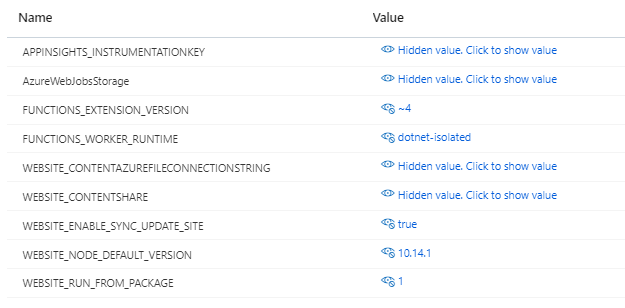
The current application settings in Azure are configured as follows:
Below is the configuration of your project file (.csproj):
<Project Sdk="Microsoft.NET.Sdk">
<PropertyGroup>
<TargetFramework>net6.0</TargetFramework>
<AzureFunctionsVersion>v4</AzureFunctionsVersion>
<OutputType>Exe</OutputType>
<ImplicitUsings>enable</ImplicitUsings>
<Nullable>enable</Nullable>
</PropertyGroup>
<ItemGroup>
<PackageReference Include="AutoMapper.Extensions.Microsoft.DependencyInjection" Version="11.0.0" />
<PackageReference Include="Microsoft.ApplicationInsights" Version="2.20.0" />
<PackageReference Include="Microsoft.Azure.Functions.Worker" Version="1.6.0" />
<PackageReference Include="Microsoft.Azure.Functions.Worker.Extensions.OpenApi" Version="1.0.0" />
<PackageReference Include="Microsoft.Azure.Functions.Worker.Extensions.Http" Version="3.0.13" />
<PackageReference Include="Microsoft.Azure.Functions.Worker.Sdk" Version="1.3.0" OutputItemType="Analyzer" />
</ItemGroup>
<ItemGroup>
<None Update="host.json">
<CopyToOutputDirectory>PreserveNewest</CopyToOutputDirectory>
</None>
<None Update="local.settings.json">
<CopyToOutputDirectory>PreserveNewest</CopyToOutputDirectory>
</None>
</ItemGroup>
</Project>
Your local.settings.json file is configured as follows:
{"IsEncrypted":false,"Values":{"AzureWebJobsStorage":"UseDevelopmentStorage=true","FUNCTIONS_WORKER_RUNTIME":"dotnet-isolated","StorageConnectionString":"UseDevelopmentStorage","APPINSIGHTS_INSTRUMENTATIONKEY":"MyInstrumentationKey"},"Host":{"LocalHttpPort":7071,"CORS":"*"}}
1. Ensure All Dependencies are Updated:
-> Ensure all the packages in your .csproj file are up-to-date.
2. Check Application Settings:
-> Verify that the FUNCTIONS_WORKER_RUNTIME is set to dotnet-isolated.
3. Deployment Issues:
-> Redeploy the function to ensure there were no issues during the deployment process.
-> Check the Azure portal logs for more detailed error information.
4. Function App Configuration:
-> Make sure that the Azure Function App is properly configured to support .NET 6.0 and is using the correct runtime version.
5. Language Workers Initialization:
-> Verify if there are any configuration issues preventing the initialization of language workers
Work with our skilled .Net developers to accelerate your project and boost its performance.
3rd Floor, Aval Complex, University Road, above Balaji Super Market, Panchayat Nagar Chowk, Indira Circle, Rajkot, Gujarat 360005.
Abbotsford, BC
15th B Street 103, al Otaiba Dubai DU 00000, United Arab Emirates
3rd Floor, Aval Complex, University Road, above Balaji Super Market, Panchayat Nagar Chowk, Indira Circle, Rajkot, Gujarat 360005.
Abbotsford, BC.
15th B Street 103, al Otaiba Dubai DU 00000, United Arab Emirates.
Copyright © 2026 Niotechone Software Solution Pvt. Ltd. All Rights Reserved.