Build Your News Section

Create a Database to Work with

The CodeIgniter installation assumes that you have set up an appropriate database, as outlined in the requirements. In this tutorial, we provide SQL code for a MySQL database, and we also assume that you have a suitable client for issuing database commands (mysql, MySQL Workbench, or phpMyAdmin).

You need to create a database ci4tutorial that can be used for this tutorial, and then configure CodeIgniter to use it.

Using your database client, connect to your database and run the SQL command below (MySQL):

Copy to clipboard
CREATE TABLE news (
    id INT UNSIGNED NOT NULL AUTO_INCREMENT,
    title VARCHAR(128) NOT NULL,
    slug VARCHAR(128) NOT NULL,
    body TEXT NOT NULL,
    PRIMARY KEY (id),
    UNIQUE slug (slug)
);

Also, add some seed records. For now, we’ll just show you the SQL statements needed to create the table, but you should be aware that this can be done programmatically once you are more familiar with CodeIgniter; you can read about Migrations and Seeds to create more useful database setups later.

A note of interest: a “slug”, in the context of web publishing, is a user- and SEO-friendly short text used in a URL to identify and describe a resource.

The seed records might be something like:

Copy to clipboard
INSERT INTO news VALUES
(1,'Elvis sighted','elvis-sighted','Elvis was sighted at the Podunk internet cafe. It looked like he was writing a CodeIgniter app.'),
(2,'Say it isn\'t so!','say-it-isnt-so','Scientists conclude that some programmers have a sense of humor.'),
(3,'Caffeination, Yes!','caffeination-yes','World\'s largest coffee shop open onsite nested coffee shop for staff only.');

Connect to Your Database

The local configuration file, .env, that you created when you installed CodeIgniter, should have the database property settings uncommented and set appropriately for the database you want to use. Make sure you’ve configured your database properly as described in Database Configuration:

Copy to clipboard
database.default.hostname = localhost
database.default.database = ci4tutorial
database.default.username = root
database.default.password = root
database.default.DBDriver = MySQLi

Setting up Your Model

Instead of writing database operations right in the controller, queries should be placed in a model, so they can easily be reused later. Models are the place where you retrieve, insert, and update information in your database or other data stores. They provide access to your data. You can read more about it in Using CodeIgniter’s Model.

Create NewsModel

Open up the app/Models directory and create a new file called NewsModel.php and add the following code.

Copy to clipboard
<?php

namespace App\Models;

use CodeIgniter\Model;

class NewsModel extends Model
{
    protected $table = 'news';
}

This code looks similar to the controller code that was used earlier. It creates a new model by extending CodeIgniter\Model and loads the database library. This will make the database class available through the $this->db object.

Add NewsModel::getNews() Method

Now that the database and a model have been set up, you’ll need a method to get all of our posts from our database. To do this, the database abstraction layer that is included with CodeIgniter – Query Builder – is used in the CodeIgniter\Model. This makes it possible to write your ‘queries’ once and make them work on all supported database systems. The Model class also allows you to easily work with the Query Builder and provides some additional tools to make working with data simpler. Add the following code to your model.

Copy to clipboard
/**
     * @param false|string $slug
     *
     * @return array|null
     */
    public function getNews($slug = false)
    {
        if ($slug === false) {
            return $this->findAll();
        }

        return $this->where(['slug' => $slug])->first();
    }

With this code, you can perform two different queries. You can get all news records, or get a news item by its slug. You might have noticed that the $slug variable wasn’t escaped before running the query; Query Builder does this for you.

The two methods used here, findAll() and first(), are provided by the CodeIgniter\Model class. They already know the table to use based on the $table property we set in NewsModel class, earlier. They are helper methods that use the Query Builder to run their commands on the current table, and returning an array of results in the format of your choice. In this example, findAll() returns an array of array.

Display the News

Now that the queries are written, the model should be tied to the views that are going to display the news items to the user. This could be done in our Pages controller created earlier, but for the sake of clarity, a new News controller is defined.

Adding Routing Rules

Modify your app/Config/Routes.php file, so it looks as follows:

Copy to clipboard
get('news', [News::class, 'index']);           // Add this line
$routes->get('news/(:segment)', [News::class, 'show']); // Add this line

$routes->get('pages', [Pages::class, 'index']);
$routes->get('(:segment)', [Pages::class, 'view']);

This makes sure the requests reach the News controller instead of going directly to the Pages controller. The second $routes->get() line routes URI’s with a slug to the show() method in the News controller.


Create News Controller

Create the new controller at app/Controllers/News.php.

Copy to clipboard
getNews();
    }

    public function show(?string $slug = null)
    {
        $model = model(NewsModel::class);

        $data['news'] = $model->getNews($slug);
    }
}

Looking at the code, you may see some similarity with the files we created earlier. First, it extends BaseController that extends a core CodeIgniter class, Controller, which provides a couple of helper methods, and makes sure that you have access to the current Request and Response objects, as well as the Logger class, for saving information to disk.

Next, there are two methods, one to view all news items, and one for a specific news item.

Next, the model() function is used to create the NewsModel instance. This is a helper function. You can read more about it in Global Functions and Constants. You could also write $model = new NewsModel();, if you don’t use it.

You can see that the $slug variable is passed to the model’s method in the second method. The model is using this slug to identify the news item to be returned.


Complete News::index() Method

Now the data is retrieved by the controller through our model, but nothing is displayed yet. The next thing to do is, passing this data to the views. Modify the index() method to look like this:

Copy to clipboard
 $model->getNews(),
            'title'     => 'News archive',
        ];

        return view('templates/header', $data)
            . view('news/index')
            . view('templates/footer');
    }

    // ...
}

The code above gets all news records from the model and assigns it to a variable. The value for the title is also assigned to the $data['title'] element and all data is passed to the views. You now need to create a view to render the news items.


Create news/index View File

Create app/Views/news/index.php and add the next piece of code.

Copy to clipboard
<h2></h2>


        <h3></h3>

        <div class="main">
            
        </div>
        <p><a href="/news/">View article</a></p>


    <h3>No News</h3>

    <p>Unable to find any news for you.</p>


Here, each news item is looped and displayed to the user. You can see we wrote our template in PHP mixed with HTML. If you prefer to use a template language, you can use CodeIgniter’s View Parser or a third party parser.


Complete News::show() Method

The news overview page is now done, but a page to display individual news items is still absent. The model created earlier is made in such a way that it can easily be used for this functionality. You only need to add some code to the controller and create a new view. Go back to the News controller and update the show() method with the following:

Copy to clipboard
getNews($slug);

        if ($data['news'] === null) {
            throw new PageNotFoundException('Cannot find the news item: ' . $slug);
        }

        $data['title'] = $data['news']['title'];

        return view('templates/header', $data)
            . view('news/view')
            . view('templates/footer');
    }
}

Don’t forget to add use CodeIgniter\Exceptions\PageNotFoundException; to import the PageNotFoundException class.

Instead of calling the getNews() method without a parameter, the $slug variable is passed, so it will return the specific news item.


Create news/view View File

The only thing left to do is create the corresponding view at app/Views/news/view.php. Put the following code in this file.

Copy to clipboard
<h2></h2>
<p></p>

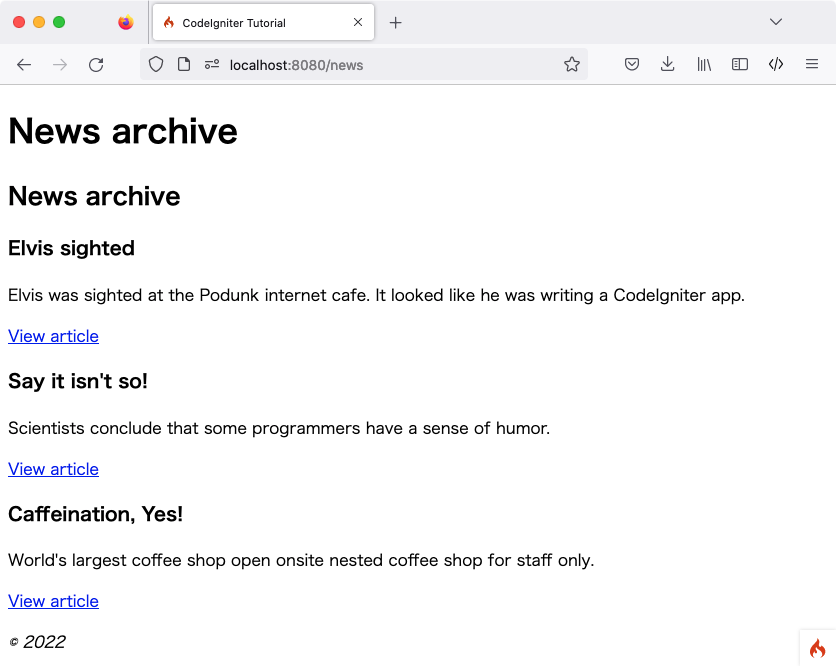
Point your browser to your “news” page, i.e., localhost:8080/news, you should see a list of the news items, each of which has a link to display just the one article.

Need Help With CodeIgniter Development?

Work with our skilled CodeIgniter developers to accelerate your project and boost its performance.

Support On Demand!