Routing associates a URI with a controller’s method. A controller is simply a class that helps delegate work. We will create a controller later.
Let’s set up routing rules. Open the routes file located at app/Config/Routes.php.
The only route directive there to start with should be:
get('/', 'Home::index');
This directive says that any incoming request without any content specified should be handled by the index() method inside the Home controller.
Add the following lines, after the route directive for '/'.
use App\Controllers\Pages;
$routes->get('pages', [Pages::class, 'index']);
$routes->get('(:segment)', [Pages::class, 'view']);
CodeIgniter reads its routing rules from top to bottom and routes the request to the first matching rule. Each rule is a regular expression (left-side) mapped to a controller and method name (right-side). When a request comes in, CodeIgniter looks for the first match, and calls the appropriate controller and method, possibly with arguments.
More information about routing can be found in the URI Routing.
Here, the second rule in the $routes object matches a GET request to the URI path /pages, and it maps to the index() method of the Pages class.
The third rule in the $routes object matches a GET request to a URI segment using the placeholder (:segment), and passes the parameter to the view() method of the Pages class.
The next thing you’re going to do is set up a controller to handle static pages. A controller is simply a class that helps delegate work. It is the glue of your web application.
Create a file at app/Controllers/Pages.php with the following code.
<?php
namespace App\Controllers;
class Pages extends BaseController
{
public function index()
{
return view('welcome_message');
}
public function view(string $page = 'home')
{
// ...
}
}
You have created a class named Pages, with a view() method that accepts one argument named $page. It also has an index() method, the same as the default controller found in app/Controllers/Home.php; that method displays the CodeIgniter welcome page.
The Pages class is extending the BaseController class that extends the CodeIgniter\Controller class. This means that the new Pages class can access the methods and properties defined in the CodeIgniter\Controller class (system/Controller.php).
The controller is what will become the center of every request to your web application. Like any PHP class, you refer to it within your controllers as $this.
Now that you’ve created your first method, it’s time to make some basic page templates. We will be creating two “views” (page templates) that act as our page footer and header.
Create the header at app/Views/templates/header.php and add the following code:
<!doctype html>
<title>CodeIgniter Tutorial</title>
<h1></h1>
The header contains the basic HTML code that you’ll want to display before loading the main view, together with a heading. It will also output the $title variable, which we’ll define later in the controller. Now, create a footer at app/Views/templates/footer.php that includes the following code:
<em>© 2022</em>
Earlier you set up a controller with a view() method. The method accepts one parameter, which is the name of the page to be loaded.
The static page bodies will be located in the app/Views/pages directory.
In that directory, create two files named home.php and about.php. Within those files, type some text – anything you’d like – and save them. If you like to be particularly un-original, try “Hello World!”.
In order to load those pages, you’ll have to check whether the requested page actually exists. This will be the body of the view() method in the Pages controller created above:
<?php
namespace App\Controllers;
// Add this line to import the class.
use CodeIgniter\Exceptions\PageNotFoundException;
class Pages extends BaseController
{
// ...
public function view(string $page = 'home')
{
if (! is_file(APPPATH . 'Views/pages/' . $page . '.php')) {
// Whoops, we don't have a page for that!
throw new PageNotFoundException($page);
}
$data['title'] = ucfirst($page); // Capitalize the first letter
return view('templates/header', $data)
. view('pages/' . $page)
. view('templates/footer');
}
}
And add use CodeIgniter\Exceptions\PageNotFoundException; after the namespace line to import the PageNotFoundException class.
Now, when the requested page does exist, it is loaded, including the header and footer, and returned to the user. If a controller returns a string, it is displayed to the user.
If the requested page doesn’t exist, a “404 Page not found” error is shown.
The first line in this method checks whether the page actually exists. PHP’s native is_file() function is used to check whether the file is where it’s expected to be. The PageNotFoundException is a CodeIgniter exception that causes the 404 Page Not Found error page to show.
In the header template, the $title variable was used to customize the page title. The value of title is defined in this method, but instead of assigning the value to a variable, it is assigned to the title element in the $data array.
The last thing that has to be done is loading the views in the order they should be displayed. The view() function built-in to CodeIgniter will be used to do this. The second parameter in the view() function is used to pass values to the view. Each value in the $data array is assigned to a variable with the name of its key. So the value of $data['title'] in the controller is equivalent to $title in the view.
Ready to test? You cannot run the app using PHP’s built-in server, since it will not properly process the .htaccess rules that are provided in public, and which eliminate the need to specify “index.php/” as part of a URL. CodeIgniter has its own command that you can use though.
From the command line, at the root of your project:
php spark serve
will start a web server, accessible on port 8080. If you set the location field in your browser to localhost:8080, you should see the CodeIgniter welcome page.
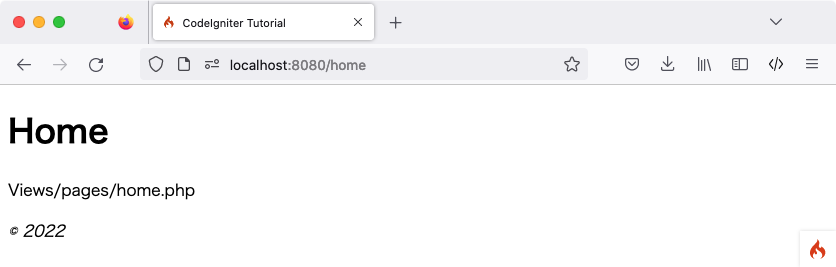
Now visit localhost:8080/home. Did it get routed correctly to the view() method in the Pages controller? Awesome!
You should see something like the following:
You can now try several URLs in the browser location field, to see what the Pages controller you made above produces…
URL | Will show |
|---|---|
localhost:8080/ | the CodeIgniter “welcome” page. the results from the |
localhost:8080/pages | the results from the |
localhost:8080/home | the “home” page that you made above, because we explicitly asked for it. the results from the |
localhost:8080/about | the “about” page that you made above, because we explicitly asked for it. |
localhost:8080/shop | a “404 – File Not Found” error page, because there is no app/Views/pages/shop.php. |
Work with our skilled CodeIgniter developers to accelerate your project and boost its performance.
3rd Floor, Aval Complex, University Road, above Balaji Super Market, Panchayat Nagar Chowk, Indira Circle, Rajkot, Gujarat 360005.
Abbotsford, BC
15th B Street 103, al Otaiba Dubai DU 00000, United Arab Emirates
3rd Floor, Aval Complex, University Road, above Balaji Super Market, Panchayat Nagar Chowk, Indira Circle, Rajkot, Gujarat 360005.
Abbotsford, BC
15th B Street 103, al Otaiba Dubai DU 00000, United Arab Emirates
Copyright © 2026 Niotechone Software Solution Pvt. Ltd. All Rights Reserved.