
Figma vs Canva: Which Is Easier for Beginner UI Design?
- Niotechone Marketing Team
Introduction: The Importance of UI Design to Beginners
UI/UX design has emerged as a pillar of software development. User interface design has a direct influence on user engagement, retention, and experience, whether you are creating a mobile app, enterprise application, or marketing site. To the novice, selecting the appropriate tool can make a significant difference in the speed of learning and the efficiency of creation.
Tools like Figma and Canva have become popular among both designers and developers. Although they are both popular, they serve slightly different audiences. Figma is popular among professional designers, and Canva is highly user-friendly, commonly used by a Custom Software Development Company in Rajkot to quickly prototype designs.
Figma: UI/UX Design Professional Tool
Figma is a web-based design application that supports contemporary UI/UX processes. It integrates interface design, prototyping, and collaboration within a single platform. It is the favourite among many ASP.NET Core Development Companies in Rajkot for designing scalable, responsive applications.
Key Features of Figma
- Design tools based on vectors: Design scalable icons, illustrations, and interfaces.
- Real-time collaboration: Two or more users can work on the same file at the same time.
- Prototyping: Web and mobile app interactive flows.
- Plugins and Widgets: Design resources, stock images, and charts.
Pros of Figma
- Best suited to professional UI/UX projects.
- Enables working remotely, ideal in distributed teams.
- Fits well with other development processes, particularly in Mobile Application Development.
Cons of Figma
- A little steep learning curve among absolute beginners.
- Needs a stable internet connection to be fully functional.
Canva: Easy-to-Use Design
Canva is a drag-and-drop design tool that makes the design process easier. It is ideal for those who are new and do not require a steep learning curve to achieve quick results. Numerous custom software development companies in Rajkot use Canva to create marketing materials and simple UI mockups.
Key Features of Canva
- Ready-made social media, presentation, and web design templates.
- Drag-and-drop design creation.
- Millions of stock photos, illustrations, and icons.
- Fast export to various formats.
Pros of Canva
- Extremely beginner-friendly.
- Perfect for marketing images, presentations, and simple UI mockups.
- Quick solutions without technical expertise.
Cons of Canva
- Poor UI/UX prototyping.
- Not applicable to advanced Mobile Application Development or enterprise app design.
Figma vs Canva
Feature / Criteria | Figma | Canva | Recommended For |
Ease of Use | Medium learning curve | Very beginner-friendly | Beginners starting with simple designs |
Collaboration | Real-time, multi-user collaboration | Limited collaboration | Teams working on projects simultaneously |
UI/UX Design Capabilities | High (prototyping, wireframing) | Low (basic UI mockups only) | Professional UI/UX design projects |
Templates & Assets | Moderate (mostly community-driven) | Extensive ready-made templates | Quick design for marketing or presentations |
Pricing | Free tier + Paid plans | Free tier + Paid plans | Budget-conscious beginners |
Mobile App Integration | Supports exporting for Mobile App Development | Limited export options | When targeting mobile app prototypes |
The Future of UI Design in 2026
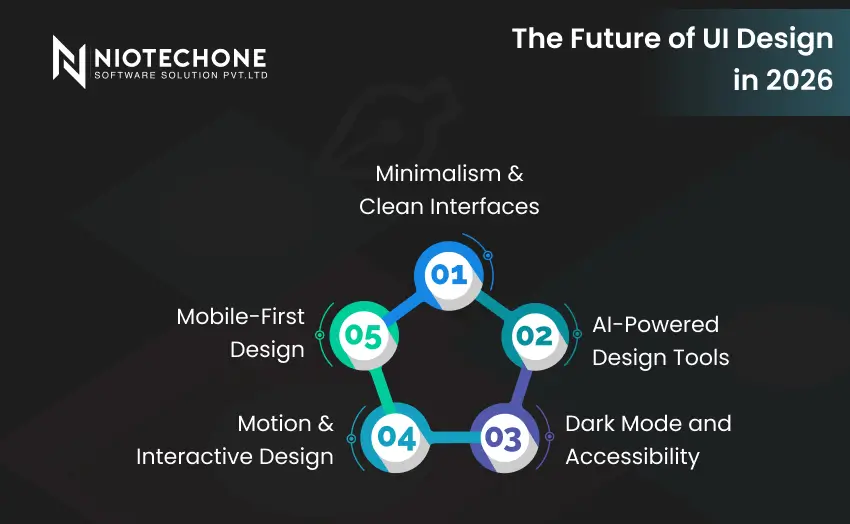
The trends in UI/UX design are changing fast in 2026, and novices must be informed of them when selecting such tools as Figma or Canva.
Minimalism & Clean Interfaces: Customers like simple and intuitive interfaces. Figma and Canva both enable the creation of minimalist layouts.
AI-Powered Design Tools: Canva offers AI-based design recommendations, and Figma offers AI-powered prototyping and layout optimization.
Dark Mode and Accessibility: Accessibility and dark mode handling are more robust in Figma for complex applications.
Motion & Interactive Design: Interactive UI and animations are on the rise. For motion and interactive design, Figma offers more advanced prototyping than Canva, which focuses mainly on static mockups.
Mobile-First Design: As the use of mobile apps is soaring, tools should be able to support mobile-friendly and responsive design. Figma is doing well in this field, and it is popular among the .NET Development Companies in Rajkot, India, to develop Mobile Applications.
Who Should Use Figma vs Canva?
Beginners in Design
Canva is the best choice when a beginner wants to achieve quick results without being overwhelmed by numerous features. It enables them to develop visual designs fast and acquire basic principles of UI.
Potential Professional UI/UX Designers
Figma is more suitable for individuals who want to pursue a career in UI/UX design. Novices can begin with basic projects and learn to use more advanced prototyping and collaboration capabilities.
Software Companies and Developers
Software Development Company in India and ASP.NET Core Development Company in Rajkot use Figma in mobile and web application development. Canva, however, is frequently utilized in the production of marketing collateral and presentation visuals in parallel with development work.
Beginner tips to start
- Start with Canva to make social media graphics, presentations, or simple UI mockups.
- Read Figma community files to learn professional UI/UX patterns.
- Combine the two tools, Canva to create marketing visuals and Figma to create application interfaces.
- Adopt a mobile-first design to match trending Mobile Application Development practices.
- Professionally develop by learning prototyping, collaboration, and using plugins in Figma gradually.
Conclusion
The selection of the appropriate design tool is essential when a beginner studies UI/UX. Canva is easier, faster, and user-friendly, which is why it is ideal when starting with the design work and marketing images. Figma, though, has professional-level features such as prototyping, collaboration, and responsive design, and is therefore the tool of choice when it comes to serious UI/UX design and Mobile Application Development.
There are numerous .NET development Companies in Rajkot, India, and a Custom Software Development Company in Rajkot that uses Figma to ensure consistency and quality of design across projects. As a beginner, it is a good idea to start with Canva and then switch to Figma to balance between learning and productivity and remain in line with the latest trends in UI design.
Categories
Related Articles

Related Tags
Frequently Asked Questions FAQs
Figma offers more sophisticated UI/UX tools, whereas Canva is easier to use as a beginner. It is possible to start with Canva and then move to Figma.
Yes, Canva is a great tool to use when you are a beginner and you want to begin designing without any previous experience, particularly when it comes to visual mockups and marketing materials.
Figma is widely preferred by .NET Development Companies in Rajkot, India, and ASP.NET Core Development Companies in Rajkot due to its professional prototyping and collaboration features.
Canva is restricted in Mobile Application Development. Figma is suggested to be used in the creation of responsive mobile interfaces and prototypes.
Beginners should start with Canva for simple, fast designs and gradually transition to Figma to handle professional UI/UX projects, including Mobile Application Development and enterprise applications.


