The Real Reasons SaaS Applications Get Slower

Introduction

SaaS products do not slow down at night. Performance degradation occurs over time, release after release, until customers start complaining. To business owners, CTOs, startup founders, and enterprise leaders, a slow SaaS platform is not just a technical problem. It affects retention, revenue, customer trust, and brand reputation.

Regardless of whether you are dealing with a .NET development company, an ASP.NET Core development company, or an internal team, it is important to know why SaaS applications slow down to create a truly scalable software application.

This guide dissects the actual causes of SaaS systems slowing down over time- and what a 2026-ready architecture should resemble.

SaaS application interface concept showing performance slowdown over time with a digital dashboard and user interaction.

Why SaaS Applications slow down with time

SaaS applications are generally slow to increase in complexity. Over time, the system added new features, integrations, and background processes. Unless the architecture is optimized continuously, performance will degrade.

Another significant factor is database growth. Big data, bulky reports, and poorly optimised queries slow response times. Delays are felt without adequate indexing, caching, and workload separation.

External integrations also play a role. Third-party APIs, payment gateways, and automation tools add latency, particularly when processed synchronously.

Infrastructure configuration is another hidden cause. Auto-scaling rules may not match real usage patterns. Caching layers might be missing or misconfigured. Logging systems could be writing excessive data during peak hours. Small inefficiencies compound under scale.

Finally, a SaaS slowdown occurs when the system grows faster than the architecture. It is not feature expansion that keeps performance constant over time, but continuous optimization.

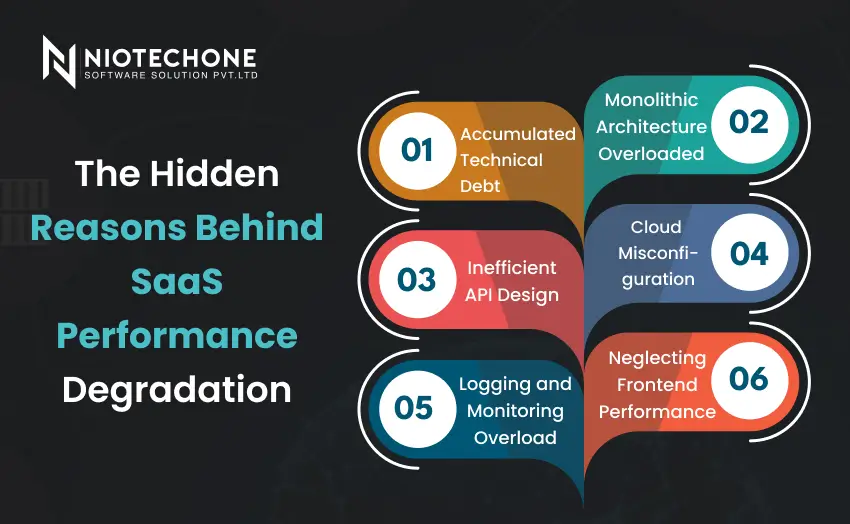
Illustration showing key reasons behind SaaS performance degradation like technical debt, monolithic architecture, and API inefficiencies.

The Hidden Reasons Behind SaaS Performance Degradation

1. Accumulated Technical Debt

Clean architecture is frequently sacrificed in favor of fast feature releases.

Over time, this leads to:

  • Duplicate business logic
  • Close interconnection of modules
  • Hard-coded configurations
  • Unproductive database queries

In the absence of robust architectural control in your ASP.NET Core application architecture, each new feature introduces performance drag.

An established custom software development company values refactoring over feature development.

2. Monolithic Architecture Overloaded

Most SaaS systems start as monoliths.

This works early on. But as modules grow:

  • Deployments become risky
  • Minor changes affect the entire system.
  • Scaling of resources is inefficient.

The ASP.NET Core development company projects are based on a modular or microservices approach that guarantees the independent scaling of components.

3. Inefficient API Design

APIs are essential to SaaS platforms.

Poor API design causes:

  • Over-fetching data
  • Excessive round-trip
  • Large payload responses
  • Blocking synchronous calls

A skilled ASP.NET Core development company deploys:

  • RESTful best practices
  • Pagination
  • Caching strategies
  • Asynchronous processing
  • Rate limiting

One of the least considered causes of SaaS slowdown is API inefficiencies.

4. Cloud Misconfiguration

Cloud does not necessarily imply scalability.

By 2026, bad cloud application development practices will lead to:

  • Overprovisioned resources
  • Underutilized instances
  • No auto-scaling rules
  • Improper load balancing
  • Slow inter-regional latency

Azure cloud architecture should not be put on autopilot but actively monitored and optimized.

5. Logging and Monitoring Overload

Ironically, logging that is supposed to enhance performance may slow applications when configured improperly.

Common mistakes:

  • Too much debugging in production.
  • Synchronous logging
  • No centralized monitoring
  • Large unfiltered log writes

Enterprise-grade systems require performance-conscious logging.

6. Neglecting Frontend Performance

SaaS performance is not only backend.

Frontend issues include:

  • Heavy JavaScript bundles
  • Unoptimized images
  • Excessive API calls
  • No CDN usage

Scalability refers to the optimization of the whole delivery pipeline- database to browser.

The Real Root Cause: Lack of Scalability-First Thinking

The majority of SaaS systems do not slow down due to growth, but rather due to the lack of scalability in the architecture.

True scalability requires:

  • Modular system design
  • Performance benchmarking
  • Pre-release load testing
  • Cloud cost governance
  • Observability integration
  • Performance prediction using AI

A progressive software development company considers performance as an ongoing process- not a one-time activity.

Performance Comparison: Early Stage vs Growth Stage SaaS

Factor

Early Stage SaaS

Growth-Ready SaaS

Architecture

Monolithic

Modular / Microservices

Database

Single instance

Partitioned + replicas

Logging

Basic

Structured + centralized

Scaling

Manual

Auto-scaling enabled

Monitoring

Reactive

Predictive & AI-driven

Cloud Usage

Static

Elastic & optimized

This shift requires technical leadership and strategic planning.

Real-World Case: SaaS CRM Platform Scaling Failure

A CRM SaaS start-up had:

  • 5-second page loads
  • API timeouts
  • Increased churn


Root causes identified:

  • No caching strategy
  • Poor indexing
  • Blocking synchronous calls
  • No load testing


Following the contracting of a professional .NET development company, the following was improved:

  • Redis caching.
  • Async API refactoring
  • Azure auto-scaling setup
  • Query optimization
  • Load testing integration


Results:

  • 68% faster API responses
  • Cost of infrastructure reduced by 40 percent.
  • Better customer retention.


It was not a growth problem, but an architectural laxity.

Key Steps to Keep Your SaaS Application Fast

To prevent slowdown:

  • Use a modular ASP.NET Core architecture.
  • Introduce systematic logging.
  • Optimize database queries regularly.
  • Use caching aggressively
  • Automate performance testing.
  • Properly configure Azure auto-scaling.
  • Monitor real-time metrics
  • Carry out quarterly architecture audits.


If you plan to hire a .NET developer, ensure they understand performance engineering—not just feature development.

2026 SaaS Performance Trends CTOs Should Be Ready For

Future-oriented organizations are investing in:

  • Observability-first architecture
  • AI-driven anomaly detection
  • Global delivery edge computing
  • Serverless backend scaling
  • Cloud orchestration that is cost-conscious
  • Live performance monitors
  • Multi-region redundancy

SaaS slowness in 2026 can be avoided–with the correct architecture.

Conclusion

SaaS applications do not decelerate as users increase. They become sluggish since architecture does not grow with it. Technical debt, database inefficiencies, cloud misconfigurations, and the absence of scalability-first planning are the causes of performance problems.

In 2026, the high-performing SaaS platforms will be developed based on robust ASP.NET Core application architecture, optimized Azure cloud architecture, and AI-based observability systems. When your SaaS product is not as fast as it was six months ago, it is time to take action.

Collaborating with a strategic custom software development company or a trusted .NET development company will make sure that your platform is fast, scalable, and prepared to take the next step of growth.

Frequently Asked Questions FAQs

New features can add load to databases, API complexity, and resource usage unless optimized appropriately.

Yes, ASP.NET Core is highly concurrent and enterprise-scalable with the right architecture and cloud setup.

Azure offers load balancing, auto-scaling, monitoring tools, and global content delivery networks.

At least once every quarter, or before big feature releases.

Yes, AI is able to identify anomalies, forecast traffic spikes, and recommend optimization.