Day 5 of your JavaScript adventure! We are going to explore one of the most potent concepts in programming today: functions. Functions are recipes that you can use again and again in your code – write them once, use them many times, and your code is cleaner, better structured, and easier to maintain.
The building blocks of any real-world application are functions. They help you:
This tutorial will discuss the traditional functions, the modern arrow functions, the parameters of the functions, the return values and the most important concept of scope (where the variables can be accessed). In conclusion, you will know how to write clean, professional JavaScript code that adheres to modern best practices.
To start with, we will make our HTML page with some placeholders to show our function results:
<title>Functions & Scope Demo</title>
<h2>Function Examples</h2>
<p id="demo"></p>
<p id="sum"></p>
<p id="area"></p>
<p id="dd"></p>
<hr>
<h2>Function Parameters</h2>
<p id="multiplication"></p>
<p id="addition"></p>
<p id="demo1"></p>
<p id="demo2"></p>
<hr>
<h2>Arrow Functions</h2>
<p id="demo3"></p>
<hr>
<h2>Scope</h2>
<p id="demo4"></p>
<hr>
<h2>Advanced Examples</h2>
<div id="output"></div>
What this does:
Pro Tip: Never mix your HTML with JavaScript code. This makes your code easier to maintain!
We will develop a basic function that welcomes a user:
function greet(name) {
document.getElementById("demo").innerHTML = "Hello, " + name + "!";
}
greet("Niotechone");
How it works:
Important Idea: Parameters are similar to placeholders that are filled in when you invoke the function. In this case, we call greet(Niotechone) with a name substituted with Niotechone.
Note: Be careful not to confuse defining a function (writing it) and calling a function (using it). You have to invoke the function to make it run!
Data can be processed by functions and results returned using the return keyword:
function addNumbers(a, b) {
return a + b;
}
let sum = addNumbers(8, 5);
document.getElementById("sum").innerHTML = "Sum is: " + sum;
Understanding return:
return a + b – Adds the two numbers and returns them to the point of the function call.
The outcome is saved in the variable sum.
This result can then be used anywhere in our code.
Why use return?
Here is a real world example:
function calculateArea(length, width) {
return length * width;
}
let area = calculateArea(7, 4);
document.getElementById("area").innerHTML = "Area is: " + area;
What makes this useful:
Best practice: you should give functions clear and descriptive names that hint at functionality (use verbs such as calculate, get, update, create).
Functions can return any data type, even strings:
function demo(name, age) {
return "Hello " + name + "! Your age is " + age;
}
document.getElementById("dd").innerHTML = demo("Niotechone", 21);
Key points:
What about when the user forgets to pass all arguments. You can prevent that with default arguments:
function Parameter(x, y) {
if (y === undefined) {
y = 2; // Set default value
}
return x * y;
}
document.getElementById("multiplication").innerHTML = Parameter(5);
// Result: 10 (because y defaults to 2)
Old way vs. New way:
// Modern ES6+ syntax (cleaner!)
function sum1(x, y = 3) {
return x + y;
}
document.getElementById("addition").innerHTML = sum1(4);
// Result: 7 (4 + 3)
Why default arguments are useful:
Pro Tip: Use the modern syntax (y = 3), it is better and cleaner. Use it if possible!
There are times when you may not have a clue how many arguments we will be passing. The rest parameters (…) can deal with this:
function rest(...args) {
let total = 0;
for (let arg of args) {
total += arg;
}
return total;
}
let x = rest(3, 46, 68, 12, 56);
document.getElementById("demo1").innerHTML = x;
// Result: 185
How …args works:
Use cases:
Before the rest parameters existed there was simply the arguments object:
function findmax() {
let max = -Infinity;
for (let i = 0; i max) {
max = arguments[i];
}
}
return max;
}
document.getElementById("demo2").innerHTML = findmax(3, 52, 45);
// Result: 52
Understanding the code:
Note: The arguments object still works today, but new code should be including rest parameters (…args) instead. They clarify your intent and the arguments object does not work well with arrow functions.”
Arrow functions are a more concise and clean way of writing functions:
// Traditional function
function multiply(a, b) {
return a * b;
}
// Arrow function (modern way!)
myfunction = (a, b) => a * b;
let result = myfunction(6, 2);
document.getElementById("demo3").innerHTML = "The Number Is: " + result;
// Result: 12
Arrow function syntax variations:
// Multiple parameters, single expression (implicit return)
const add = (a, b) => a + b;
// Single parameter (parentheses optional)
const square = x => x * x;
// No parameters
const greet = () => "Hello!";
// Multiple statements (need curly braces and explicit return)
const calculate = (a, b) => {
let sum = a + b;
let product = a * b;
return sum + product;
};
Why the need for arrow functions?
Note: Arrow functions with one expression auto-return (no return statement needed).
The scope is what determines what parts of your code can access the variable:
if (true) {
var a = 10; // Function-scoped
let b = 20; // Block-scoped
const z = 30; // Block-scoped
}
console.log(a); // Works! Prints: 10
console.log(b); // Error! b is not defined
console.log(z); // Error! z is not defined
The critical difference:
Keyword | Scope | Can Reassign? | Hoisted? |
var | Function | Yes | Yes |
let | Block | Yes | No |
const | Block | No | No |
Block scope means that the variable exists only in the { } curly braces where defined.
Big Rule: Use let or const in modern JavaScript. Do not use var, unless you really need to!
Variables that are declared outside of a function are accessible everywhere:
let car = "volvo"; // Global variable
myfun();
function myfun() {
document.getElementById("demo4").innerHTML = "I can display " + car;
}
Scope hierarchy:
Best Practice: Use as few global variables as possible. They can clash, and make debugging the code difficult!
Let’s test all of these definitions of scope together:
const out = document.getElementById("output");
// Helper function for logging
const log = (msg) => {
console.log(msg);
out.innerHTML += msg + "<br>";
};
function testScope() {
if (true) {
var varVariable = "I am var";
let letVariable = "I am let";
const constVariable = "I am const";
log("Inside block (var): " + varVariable);
log("Inside block (let): " + letVariable);
log("Inside block (const): " + constVariable);
}
// var escapes the block!
log("Outside block (var): " + varVariable); // Works!
// let and const don't escape
try {
log("Outside block (let): " + letVariable);
} catch (e) {
log("Outside block (let): ERROR - " + e.message);
}
try {
log("Outside block (const): " + constVariable);
} catch (e) {
log("Outside block (const): ERROR - " + e.message);
}
}
testScope();
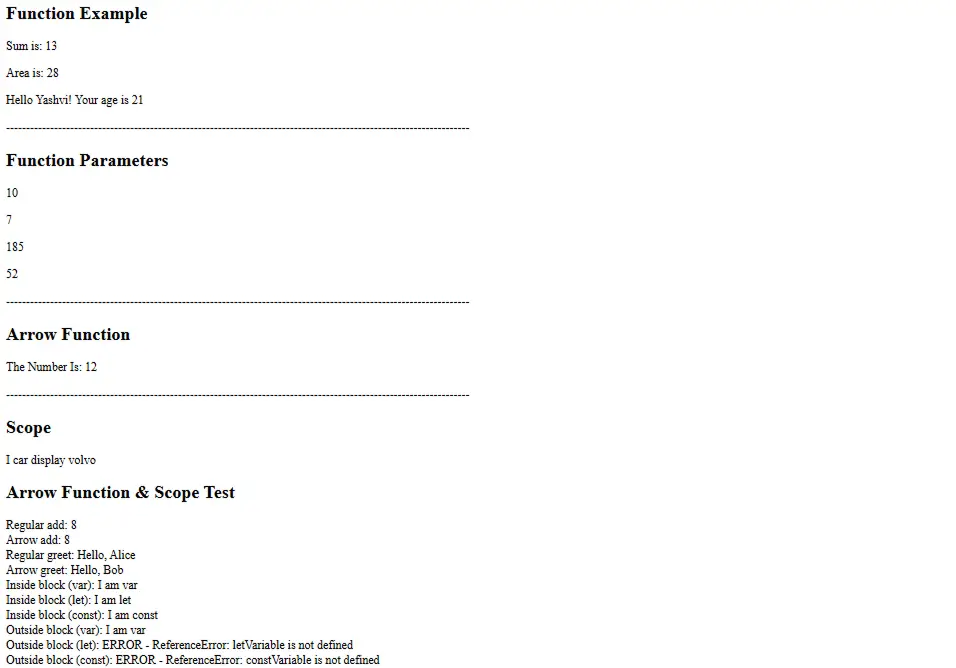
What this will show:
Pro Tip: A try-catch block is useful to check if a variable exists or a block of code will run without an error!
Let’s directly compare the two syntaxes:
// Traditional Functions
function add(a, b) {
return a + b;
}
function greet(name) {
return `Hello, ${name}`;
}
// Arrow Function Equivalents
const addArrow = (a, b) => a + b;
const greetArrow = name => `Hello, ${name}`;
// Test both
log("Regular add: " + add(5, 3)); // 8
log("Arrow add: " + addArrow(5, 3)); // 8
log("Regular greet: " + greet("Alice")); // Hello, Alice
log("Arrow greet: " + greetArrow("Bob")); // Hello, Bob
Notice the differences:
When to use which:
1. Functions & Keywords Used
Name | Description |
function | Keyword to declare a traditional function |
return | Sends a value back from a function to the caller |
=> (arrow) | Modern syntax for creating arrow functions |
…args | Rest parameter – collects all arguments into an array |
arguments | Legacy object containing all function arguments |
var | Function-scoped variable declaration (avoid in modern code) |
let | Block-scoped variable declaration (can be reassigned) |
const | Block-scoped constant declaration (cannot be reassigned) |
try-catch | Error handling block to catch and handle exceptions |
Template literals | String syntax using backticks (`) with ${} interpolation |
undefined | Value when a variable is declared but not assigned |
-Infinity | Smallest possible number in JavaScript |
2. Key Concepts & Features
Name | Description |
Function Declaration | Defining a function with function name() {} |
Function Call | Executing a function by writing its name with parentheses |
Parameters | Variables listed in function definition (placeholders) |
Arguments | Actual values passed when calling a function |
Default Parameters | Values used when arguments are not provided |
Return Value | Data sent back from a function |
Implicit Return | Arrow functions automatically return single expressions |
Global Scope | Variables accessible from anywhere in the code |
Function Scope | Variables only accessible within the function |
Block Scope | Variables only accessible within { } curly braces |
Hoisting | JavaScript’s behavior of moving declarations to the top |
Arrow Function | Concise function syntax: (params) => expression |
Rest Parameter | Collects multiple arguments into a single array |
Scope Chain | JavaScript searches for variables from inner to outer scopes |
Functions Documentation:
Scope & Variables:
Interactive Practice:
Advanced Topics:
Video Tutorials:
The 5th day of the course focuses on 3 key topics that are essential to developing organized and interactive JavaScript applications. They are functions, objects and events. The first topic you will cover is how Functions allow you to write codes that can be reused, by accepting inputs (parameters) and returning outputs thus creating less clutter and larger scalable programmes. You will then cover the second topic which is Objects, a type of data structure used to store related information using Key-Value Pairs, this will help you keep a more effective structure for your code, and find meaning in the code. Finally, you will learn about Events, which are the ways in which your webpage will respond to what the user does. Examples of Events include clicking, pressing a key, moving a mouse. At the end of the 5th Day, you will know how to create and invoke Functions, Create and utilise Objects and how to respond to events in order to create a webpage that is both Dynamic and Interactive.
A function is a reusable block of code designed to perform a specific task.
return sends a value back to the place where the function was called.
Yes, These functions are called methods inside objects.
Events are actions that happen in the browser (clicks, keypresses, loading, scrolling).
A built-in event that triggers when a user clicks an HTML element.
Copyright © 2026 Niotechone Software Solution Pvt. Ltd. All Rights Reserved.