JavaScript Day 4: Conditions and Loops

Introduction

Welcome to an exciting adventure into the world of JavaScript control structures! In this tutorial, we will look at conditionals (if-else, switch) and loops (for, for-in, for-of, do-while), the two main building blocks that give logic and interactivity to your web apps.

Why are these concepts important?

Because you’re new to programming, learning conditionals and loops is vital because they allow your programs to make decisions, and carry out repetitive tasks easily. Whether this is to build a grade calculator, dynamic menu, or process user data, these concepts will form the backbone of most every program you write. The ability of your code to behave intelligently in a responsive way was not even possible without these constructs. This will allow you to move quickly to building engaging applications that not only are not just simply static code, but respond intelligently and adapt to a variety of circumstances and can process more complex structures.

So without further ado, let’s jump into and create a complete demo that covers all of these concepts in play! 

Step-by-Step Tutorial

Step 1: Setting Up the HTML Structure

First, we will create a simple HTML page to display our JavaScript results:

🌐
<title>JS Conditionals & Loops Demo</title>


    <h1>JavaScript Control Structures Demo</h1>
    <h2>Open Browser Console (F12) for Details</h2>
    
    <!-- Placeholders for different examples -->
    <h3>If-Else Examples</h3>
    <p id="demo"></p>
    <hr>
    <p id="demo1"></p>
    <hr>
    <p id="demo2"></p>
    <hr>
    <p id="demo3"></p>
    
    <h3>Switch Statement</h3>
    <p id="demo4"></p>
    <hr>
    
    <h3>Boolean Logic</h3>
    <p id="demo5"></p>
    
    <h3>Loop Examples</h3>
    <p id="demo6"></p>
    <hr>
    <p id="demo7"></p>
    <hr>
    <p id="demo8"></p>
    <hr>
    <p id="demo9"></p>
    <hr>
    <p id="demo0"></p>


What this does:

  • Creates multiple <p> tags with different IDs to display the different javascript outputs
  • Links an external javascript file (Index.js) where our logic will live
  • Uses semantic html5 headings to format the content nicely

 
Pro Tip:
Always use meaningful IDs for your HTML elements for clearer and more readable DOM manipulation

Step 2: Basic If Statement - Time-Based Greeting

Let’s begin by implementing a basic if statement that demonstrates checking the current hour in JS.

🌐
// Check if current hour exists (always true)
if(new Date().getHours()){
    document.getElementById("demo").innerHTML = "GOOD DAY!";
    console.log("GOOD DAY!");
}

How it works: 

  • new Date().getHours() returns the current hour of the day (0-23).
  • Because any number other than 0 is truthy in Javascript, the condition is thus almost always true.
  • We are modifying the html with getElementById() and innerHTML. 
  • We are also logging to the console to check things out.


Note:
This example demonstrates a basic if statement, but the condition could be improved for real-world use!

Step 3: If-Else Statement - Morning vs Evening

Now let’s add an else clause, in order to create something a little more specific.

📄
const hour = new Date().getHours();
let greeting;

if(hour < 10){
    greeting = "GOOD DAY!";
} else {
    greeting = "GOOD EVENING";
}

document.getElementById("demo1").innerHTML = greeting;
console.log(greeting);

What’s happening here: 

  • We are storing the current hour in a variable made from `const` (this value will not change).
  • We are declaring a greeting with let because we will be assigning the variable’s value based on the conditional.
  • Therefore, if it is before 10:00 am, it will create one greeting, if any time after it will create another greeting.
  • This is resulting in creating a basic binary decision tree. 


Common Mistake:
Forgetting to declare a variable before using it in the conditional. Always use let, const, or var! 

Step 4: If-Else-If Chain - Multiple Time Periods

To create even more granularity, we can incorporate an else if’:

📄
const time = new Date().getHours();
let greet;

if(time < 12){
    greet = "GOOD MORNING";
} else if(time < 20){
    greet = "GOOD DAY";
} else {
    greet = "GOOD EVENING";
}

document.getElementById("demo2").innerHTML = greet;
console.log(greet);

Why use else-if?

  • Because it allows us to check multiple conditions, in a sequence. 
  • Only the first meets the condition will get executed.
  • It is more efficient than running multiple, separate if statements. 
  • This idea can be particularly useful for categorizing data into ranges (e.g., time of day, testing grade levels, age groups, etc).


Time breakdown:

  • Before 12:00 → Morning
  • 12:00 to 19:59 → Day
  • 20:00 onwards → Evening

Step 5: Random Conditional - Dynamic Links

I’ll demonstrate a randomization example:

🌐
let ifelse;

if(Math.random() < 0.6){
    ifelse = "<a href='https://w3schools.com'>W3 SCHOOL</a>";
} else {
    ifelse = "<a href='https://wwf.org'>visit WWF</a>";
}

document.getElementById("demo3").innerHTML = ifelse;
console.log(ifelse);

Understanding Math.random():

  • Math.random() produces a decimal between 0 and 1
  • 60% of getting W3Schools link
  • 40% of getting WWF link
  • Great for A/B testing, random content, or gaming


Pro Tip:
You can use Math.random() to make random selections, shuffle algorithms, and create unpredictable user experiences!

Step 6: Switch Statement - Day of the Week

Switch statements are great for checking one value against many different cases:

📄
let day;

switch(new Date().getDay()){
    case 0:
        day = "Sunday";
        break;
    case 1:
        day = "Monday";
        break;
    case 2:
        day = "Tuesday";
        break;
    case 3:
        day = "Wednesday";
        break;
    case 4:
        day = "Thursday";
        break;
    case 5:
        day = "Friday";
        break;
    case 6:
        day = "Saturday";
        break;
    default:
        day = "Looking Forward to weekend";
}

document.getElementById("demo4").innerHTML = "Today is " + day;
console.log("Today is " + day);

Why switch instead of if-else?

  • Cleaner syntax when checking one variable against many values
  • Easier to read when using multiple exact-match conditions
  • The break statement prevents a fall-through to the next case
  • And the default case checks for any unexpected values 


Critical:
Always use break statements! If you skip them, execution continues to the next case.

Step 7: Boolean Comparison

Knowing about truthy and falsy values:

📄
let x = 4;

document.getElementById("demo5").innerHTML = (x == 4);  // Returns true
console.log(x != 4);  // Returns false

Boolean operators:

  • == checks value equality (loose comparison)
  • === checks value AND type equality (strict comparison)
  • != checks inequality
  • !== checks strict inequality


Best Practice:
Always use === and !== for comparisons to avoid type coercion bugs!

Step 8: For Loop - Iterating Arrays

The classic for loop for arrays:

📄
const cars = ["BMW", "Volvo", "Ford", "Audi"];
let text = "";

for(let i = 0; i < cars.length; i++){
    text += cars[i] + "<br>";
}

document.getElementById("demo6").innerHTML = text;
console.log(text);

Loop anatomy:

  1. let i = 0 – Initialize counter
  2. i < cars.length – Condition to continue
  3. i++ – Increment after each iteration
  4. Loop body executes once per array element


Use cases:
Processing lists, generating HTML from data, computing sums, maximum value.

Step 9: For-In Loop - Object Properties

Perfect for iterating over object properties:

📄
const person = {fname: "Niotechone", lname: "Company", age: 21};
let text1 = "";

for(let x in person){
    text1 += person[x] + " ";
}

document.getElementById("demo7").innerHTML = text1;
console.log(text1);

How for-in works: 

  • x receives each property name (key), as a string
  • Person[x] accesses the value using bracket notation
  • Iterates over all enumerable properties


Note: For-in loops work on objects; for-of loops work on iterables (for example, arrays)!

Step 10: For-Of Loop - Array Values

This allows for direct access to the array values:

📄
const numbers = [2, 45, 23, 76];
let txt = "";

for(let x of numbers){
    txt += x + "<br>";
}

document.getElementById("demo8").innerHTML = txt;
console.log(x);

For-of advantages: 

  • Has simpler syntax than a typical for loop
  • Doesn’t require managing index variable
  • Works on arrays, strings, Maps, Sets, and other iterables
  • More readable and reduces possibility of errors

Step 11: Do-While Loop - Execute First, Check Later

📄
let text2 = "";
let i = 0;

do {
    text2 += "<br>The Number Is " + i;
    i++;
} while(i < 10);

document.getElementById("demo9").innerHTML = text2;

Do-while characteristic: 

  • Always runs at least one time before it checks the conditional 
  • Useful if you need execution of first occurrence guaranteed
  • Found in menu systems, game loops, verifications, etc. 


Difference from while loop:

  • while checks the condition first
  • do-while checks the condition after execution

Step 12: Continue Statement - Skipping Iterations

📄
let txt1 = "";

for(let i = 0; i < 10; i++){
    if(i === 4){continue;}
    txt1 += "The Number is " + i + "<br>";
}

document.getElementById("demo0").innerHTML = txt1;

Continue vs Break: 

  • continue – Will skip the current iteration and continue to the next 
  • break – Will completely exit the loop 

Real application examples: Filtering out invalid data, skipping bad entries, or removing unneeded values during processing.

Tables of Key Concepts

1. Control Structures & Keywords Used

Name

Description

if

Executes code block if condition is true

else

Executes code block if if-condition is false

else if

Tests additional conditions if previous ones are false

switch

Evaluates an expression and matches it to case clauses

case

Defines a possible value in a switch statement

break

Exits a switch case or loop

default

Executes in switch when no case matches

for

Creates a loop with initialization, condition, and increment

for-in

Iterates over object properties

for-of

Iterates over iterable values (arrays, strings)

while

Repeats while condition is true (checks first)

do-while

Executes once, then repeats while condition is true

continue

Skips current iteration and moves to next

2. Key Methods & Properties

Name

Description

new Date()

Creates a Date object with current date/time

.getHours()

Returns hour (0-23) from Date object

.getDay()

Returns day of week (0=Sunday, 6=Saturday)

Math.random()

Returns random decimal between 0 and 1

document.getElementById()

Selects HTML element by its ID attribute

.innerHTML

Gets or sets HTML content of an element

.length

Returns number of elements in array

console.log()

Outputs message to browser console

==

Loose equality comparison (value only)

===

Strict equality comparison (value and type)

Template literals ()

String syntax allowing embedded expressions with ${}

.join()

Converts array to string with specified separator

Summary - What You Learned

On Day 4 you focus on using logic-building tools in JavaScript that allow you to control what happens based on certain conditions or scenario changes using the conditional statements that will determine which of the code gets executed. This means that the order in which your code executes is dependent upon whether or not certain conditions are met. Additionally, you get to work with different looping styles in JavaScript including: for, while, and do – which means if you have some tasks to be repeated many times without having to write the same piece of code several times in order to achieve that goal. Once you have knowledge of Conditions and Loops, the capability of creating Dynamically-Controlled and Automated JavaScript Applications becomes available.

Output

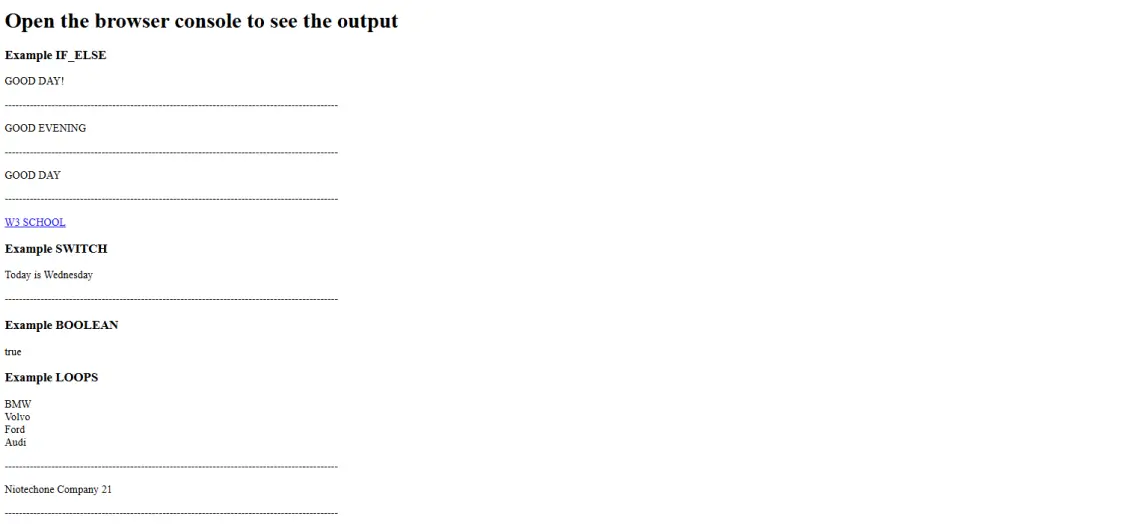
JavaScript program output displaying examples of conditions, loops, functions, and boolean results.
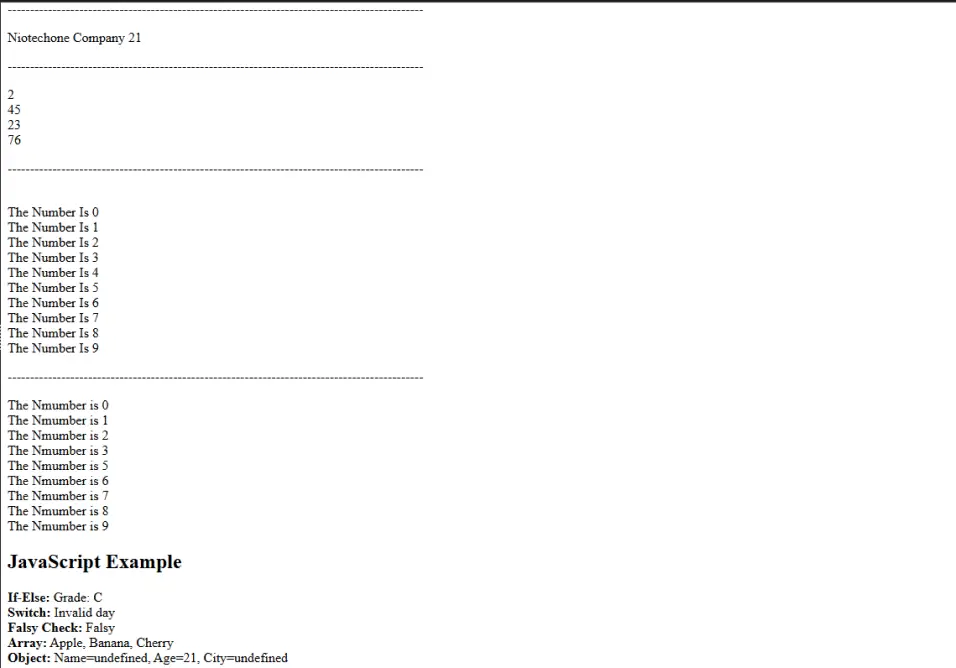
JavaScript program output showing looped numbers, array values, object details, and conditional checks.

Frequently Asked Questions FAQs

Conditions are statements that allow your program to make decisions based on whether something is true or false.

The if statement checks a condition and runs code only when the condition is true.

Use else if when you want to check multiple conditions one after another.

Loops repeat a block of code multiple times until a defined condition becomes false.

Yes, You can put loops inside loops or conditions inside conditions to build complex logic.