We will learn the basics of programming: syntax, variables, and comments. You can think of these as the grammar of coding, the toolbox, and the sticky notes of programming!
It is important to get these basics down, because this is the basis of all you will build with JavaScript! Just as you learned the alphabet before you learned how to write sentences, you need to find out what variables are and what syntax is before you can build amazing web applications. Once you complete this lesson, you will be able to store data, write clean code, and add helpful notes to your code!
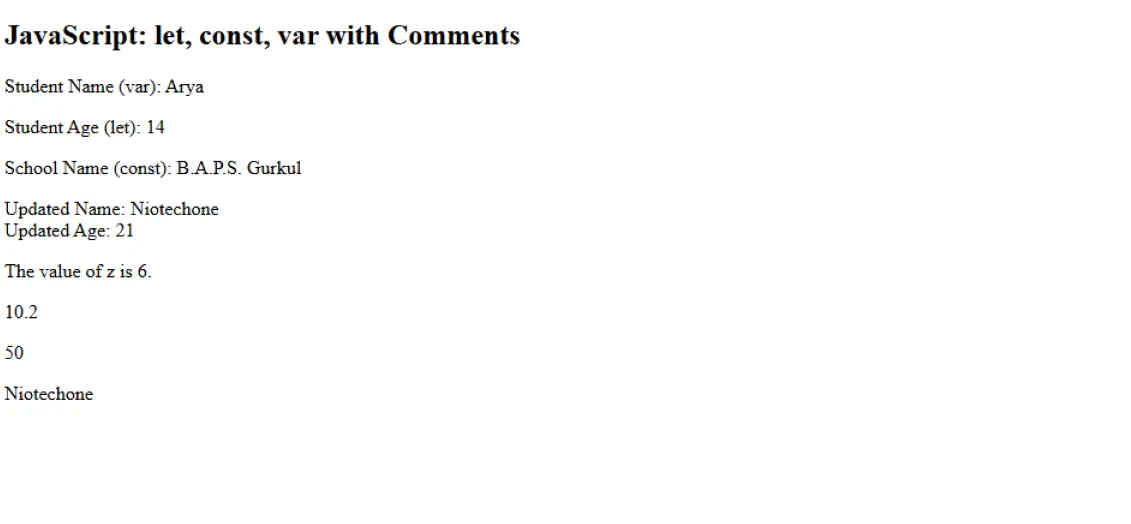
First, we will build a simple website in order to display our outputs from the JavaScript explained in this lesson:
<title>JavaScript Day 2 - Variables & Comments</title>
<h2>JavaScript: let, const, var with Comments</h2>
<p id="nameOutput">Name will appear here.</p>
<p id="ageOutput">Age will appear here.</p>
<p id="schoolOutput">School will appear here.</p>
<p id="updateOutput">Updated info will appear here.</p>
<p id="sum"></p>
<p id="demo2"></p>
<p id="multiplication"></p>
<p id="var"></p>
What the code does:
How the structure works:
Pro Tip: When labeling your elements with ids, it is a good idea to give it a meaningful id, this will make your code easier to read and maintain!
Now let’s talk about the three ways to declare variables in JavaScript:
// Single-line comment: Declare a variable using var, let, const
var studentName = "Arya";
document.getElementById("nameOutput").innerHTML = "Student Name (var): " + studentName;
let studentAge = 14;
document.getElementById("ageOutput").innerHTML = "Student Age (let): " + studentAge;
const schoolName = "B.A.P.S. Gurukul";
document.getElementById("schoolOutput").innerHTML = "School Name (const): " + schoolName;
What the code does:
Why are there three types of variables:
Common Mistake: Trying to assign a const variable will throw an error! If it should not change, you should probably use const.
Comments are notes for yourself and other developers. Here’s how the comments work:
/*
Multi-line comment:
This section demonstrates how to update variable values
and display the updated information
*/
studentName = "yashvi";
studentAge = 21;
document.getElementById("updateOutput").innerHTML =
"Updated Name: " + studentName + "<br>" +
"Updated Age: " + studentAge;
What the code does:
Why are the comments important:
Note: Good comments explain why you are doing something, not just what you are doing!
JavaScript allows you to declare multiple variables in one line:
let carName = "bmw", person = "Niotechone", price = 200000;
document.getElementById('var').innerHTML = person;
What this code does:
Why you might use this:
Pro Tip: While you can do this, it’s usually best to declare variables on separate lines for clarity!
Let’s turn our attention to doing math operations and some debugging features:
document.getElementById('demo2').innerHTML = 10.20;
let x, y, z;
x = 3;
y = 3;
z = x + y;
document.getElementById("sum").innerHTML = "The value of z is " + z + ".";
document.getElementById("multiplication").innerHTML = 5 * 10;
let name = "Niotechone";
console.log(name);
What this code does:
Why these techniques matter:
Debugging Tip: You can always check to see console.log() outputs in your browser console (F12 → Console)!
Variable Declaration and Scope
var studentName = "Niotechone";
let studentAge = 14;
const schoolName = "B.A.P.S. Gurkul";
How these work differently:
The Significance of Scope: Scope determines where your variables can (or cannot) be accessed. Block Scope is more predictable than Function Scope.
Comment Syntax and Best Practices
// Single-line comment
/*
Multi-line comment
Can span multiple lines
*/
How comments work:
When to use comments:
String Concatenation and HTML Output
document.getElementById("updateOutput").innerHTML =
"Updated Name: " + studentName + "<br>" +
"Updated Age: " + studentAge;
How this connects elements:
The Importance of Strings: Most web development is all about text data and displaying it in various ways!
A. Components / Keywords Used
Name | Description |
var | Declares a function-scoped or globally-scoped variable |
let | Declares a block-scoped local variable |
const | Declares a block-scoped constant that can’t be reassigned |
// | Single-line comment syntax |
/* */ | Multi-line comment syntax |
console.log() | Outputs messages to the browser console |
B. Key Properties / Parameters / Features
Name | Description |
Variable Scope | Determines where a variable can be accessed in code |
String Concatenation | Combining strings using the + operator |
Block Scope | Variables accessible only within {curly braces} |
Reassignment | Changing a variable’s value after declaration |
Constant | A variable whose value cannot be changed |
innerHTML | Property that sets or gets HTML content |
In day 2, you will learn the basic concepts of JavaScript, which include syntax, variables and comments as these are the essential components of every JS program. You will learn about how to write JavaScript statements and how semicolons, whitespace and indentation can help you write clear and maintainable code. You Also learn about naming conventions and how they help others understand your programs When you want to write effective JavaScript statements, you need to become familiar with variables (var, let, const) and how they are used to create and manage data in memory. Finally, you will learn how to use comments to create and organize your code Is Being Effective at documenting your code. By the end of day 2, you should have a solid foundation for writing simple JavaScript statements, defining variables, selecting appropriate variable types, and writing comments for clarity.
JavaScript syntax is the set of rules that determines how JS code must be written and structured. It includes statements, keywords, braces, parentheses, and operators.
Semicolons are optional because of JavaScript’s automatic semicolon insertion (ASI), but using them is considered good practice for clean and predictable code.
Use let for values that change and const for values that don’t. Avoid var unless required for legacy code.
Comments are notes in your code that are ignored by the browser and help make your code easier to understand.
Comments explain complex code, improve readability, help teamwork, and make future updates easier.
Copyright © 2025 NioTechOne Software Solution Pvt. Ltd. All Rights Reserved.