Welcome to your initial day practicing JavaScript! This is the part where you start your programming trip. In today’s lesson, we’re going to cover precisely what JavaScript is, as well as how JavaScript enhances web pages to make them more interactive and dynamic.
JavaScript is like the “magic” that you can apply to a website. It’s what makes buttons on a website do something, it causes content to change, and allows a page to respond to a user’s action. Learning JavaScript is extremely important because it’s the programming language of the web and is used in over 97% of all websites! At the end of this lesson you’ll be able to create web pages that interact with a user, change content based on events on a page, and even do basic calculations.
Let’s create a simple HTML structure that we can use to practice some JavaScript:
<title>JavaScript Day 1</title>
<h3>JavaScript Can Change HTML Content</h3>
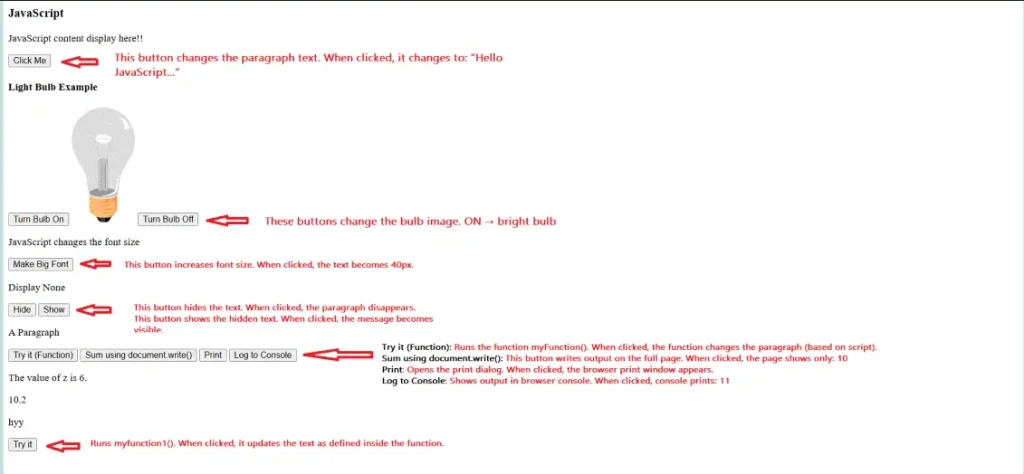
<p id="demo">JavaScript content display here!!</p>
<button>
Click Me
</button>
What this code does:
Why we add this code to our structure:
Pro Tip: Always place JavaScript files at the end of the body.
Now let’s take a look at the JavaScript file that controls everything:
// Display a decimal number
document.getElementById('demo2').innerHTML = 10.20;
// Working with variables and math
let x, y, z;
x = 3;
y = 3;
z = x + y;
document.getElementById("sum").innerHTML = "The value of z is " + z + ".";
What this code does:
Why we use variables:
Common Mistake: Forgetting the semicolon at the end of statements. While JavaScript is forgiving, it’s good practice to include them.
Functions are reusable blocks of code. Here’s how to create one:
function myFunction() {
document.getElementById("demo3").innerHTML = "Paragraph changed using JavaScript function!";
}
What this code does:
Why we use functions:
Note: Functions do not run automatically, they need to be called with a button click or some other way!
Let’s create some interactive things:
<h4>Light Bulb Example</h4>
<button>
Turn Bulb On
</button>
<img id="image" src="../pic_bulboff.gif" style="width:100px">
<button>
Turn Bulb Off
</button>
What this code does:
Why is this important:
JavaScript provides multiple ways to display information:
<!-- Method 1: Changing HTML content -->
<button>
Change Content
</button>
<!-- Method 2: Using document.write() -->
<button>
Sum using document.write()
</button>
<!-- Method 3: Console logging -->
<button>
Log to Console
</button>
<!-- Method 4: Window printing -->
<button>
Print
</button>
What these methods do:
Pro Tip: Use console.log() often for debugging – it’s your best friend when things go wrong!
Understanding JavaScript Statements
let x, y, z;
x = 3;
y = 3;
z = x + y;
How this works:
Why the order matters: JavaScript reads code in order and will not allow a variable to be referenced prior to it being declared.
Event Handling with onclick
<button>
Click Me
</button>
How this connects:
Why are events still powerful? An event can do things like change a web page when a user clicks, hovers, or even types!
CSS Manipulation with JavaScript
<p id="fontsize">JavaScript changes the font size</p>
<button>
Make Big Font
</button>
How it works:
Why it matters: specifically, it shows how JavaScript can be used to create dynamic visual effects and responsive interfaces.
1. Components / Keywords Used
Name | Description |
document.getElementById() | Finds and selects an HTML element by its ID |
innerHTML | Gets or sets the HTML content inside an element |
let | Declares a variable that can be reassigned |
function | Defines a reusable block of code |
onclick | Event that occurs when an element is clicked |
console.log() | Outputs information to the browser console |
2. Key Properties / Parameters / Features
Name | Description |
src | HTML attribute that specifies the source of an image |
style | JavaScript property that controls CSS styles |
display | CSS property that controls element visibility |
document.write() | Method that writes directly to HTML document |
window.print() | Opens the browser’s print dialog |
Variables | Containers that store data values |
The first day of your training introduces you to the essential aspects of JavaScript, which provides dynamic and interactive elements to web pages. In this day’s training, you will gain a basic understanding of JavaScript, including how JavaScript operates in the browser and how JavaScript has become an integral part of contemporary web development. Among the topics covered in this lesson are: variables, data types, operators, comments, and a simple JS program structure. You will also learn how to connect JavaScript with HTML by creating three different types of scripts: internal, external, and inline scripts.
JavaScript is a programming language used to add interactivity, dynamic behavior, and logic to websites.
It enables features like form validation, animations, sliders, dropdowns, dynamic content updates, API calls, and much more—making websites interactive.
Browsers have built-in JavaScript engines (like Chrome’s V8) that read and execute JS code.
Registration Form: Allows new users to create an account by providing their name, email, and password.
Both Forms typically have similar input fields but serve different purposes.
Variables store data values that can be reused or modified. JavaScript uses var, let, and const to declare variables.
JS has primitive data types like string, number, boolean, null, undefined, bigint, symbol, and non-primitive types like objects and arrays.
Copyright © 2025 NioTechOne Software Solution Pvt. Ltd. All Rights Reserved.