Day 6 of your JavaScript adventure! We are going to discuss two of the most basic and most powerful data structures in programming today: Objects and Arrays. Imagine objects as digital boxes containing similar information (such as the profile of a person with name, age, and hobbies), and arrays as lists (such as a shopping list or a playlist).
In practice, you always deal with structured data:
It is important to understand these concepts since:
At the conclusion of this tutorial, you will be able to create objects using methods, access properties in various ways, and manipulate data using powerful array methods like a pro!
We will begin with a basic HTML page to show our JavaScript output:
<title>Day 6 - Objects & Arrays</title>
body {
font-family: Arial, sans-serif;
max-width: 800px;
margin: 40px auto;
padding: 20px;
background-color: #f5f5f5;
}
p {
background: white;
padding: 15px;
border-left: 4px solid #3498db;
margin: 15px 0;
box-shadow: 0 2px 4px rgba(0,0,0,0.1);
}
<h1>JavaScript Objects & Arrays Demo</h1>
<h2>Check the Console (F12) for detailed output!</h2>
<h3>Object Example:</h3>
<p id="car"></p>
<h3>Object with Getters/Setters:</h3>
<p id="demo"></p>
What this does:
Pro Tip: You should always open your browser Developer Console (F12) to view console.log() outputs. It is here that we learn the majority of things!
Objects consist of related properties (data) and methods (functions). We will make a basic car object:
let car = {
type: "volvo",
color: "white",
weight: 900
};
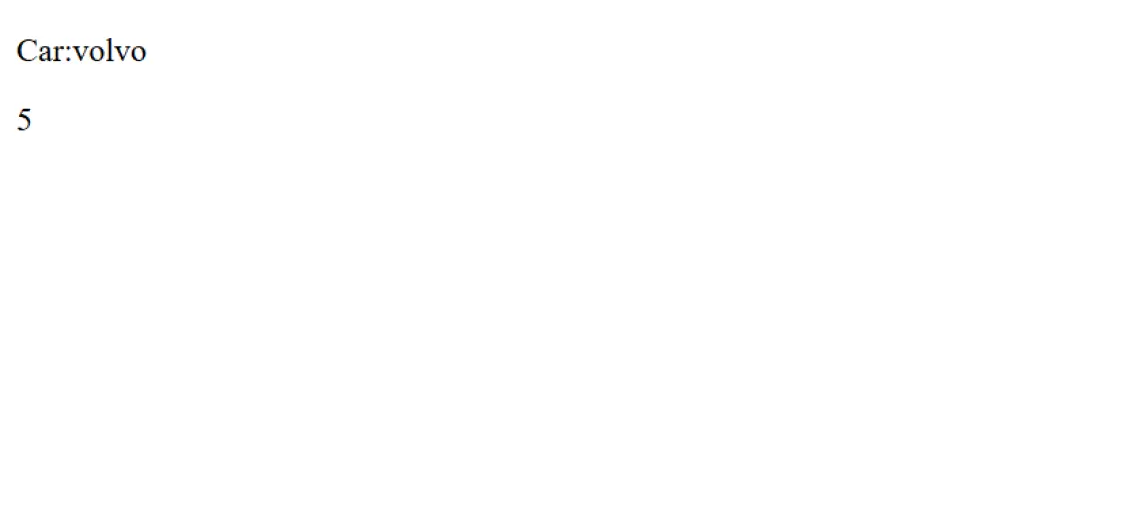
document.getElementById("car").innerHTML = "Car: " + car.type;
How it works:
Two ways to access properties:
console.log(car.type); // Dot notation (most common)
console.log(car[“color”]); // Bracket notation (useful for dynamic keys)
When to use bracket notation:
Note: The names of the object properties are referred to as keys, and the data they contain are referred to as values. They are collectively known as key-value pairs.
JavaScript enables you to create special properties which behave like functions. These are referred to as getters (read values) and setters (write values):
const obj = { counter: 0 };
// Define a GETTER - reads like a property but runs a function
Object.defineProperty(obj, "reset", {
get: function () {
this.counter = 0;
}
});
Object.defineProperty(obj, "Increment", {
get: function () {
this.counter++;
}
});
Object.defineProperty(obj, "Decrement", {
get: function () {
this.counter--;
}
});
// Define SETTERS - accept values
Object.defineProperty(obj, "add", {
set: function (value) {
this.counter += value;
}
});
Object.defineProperty(obj, "subtract", {
set: function (value) {
this.counter -= value;
}
});
// Using the getters and setters
obj.reset; // Calls the reset getter (sets counter to 0)
obj.add = 6; // Calls the add setter (counter becomes 6)
obj.subtract = 1; // Calls subtract setter (counter becomes 5)
obj.Increment; // Calls Increment getter (counter becomes 6)
obj.Decrement; // Calls Decrement getter (counter becomes 5)
document.getElementById("demo").innerHTML = obj.counter; // Displays: 5
Understanding the flow:
Why use getters and setters?
Notice: It is important to note that getters are called without parentheses (obj.reset, not obj.reset()) and setters are called with the assignment operator (obj.add = 6).
We will create a full object with different data types and functions:
const person = {
// Simple properties
firstName: "Niotechone",
lastName: "Technology",
age: 22,
// Array property
hobbies: ["reading", "coding", "traveling"],
// Method: function inside an object
fullName: function () {
return this.firstName + " " + this.lastName + " " + this.age + " " + this.hobbies;
},
// Another method
greet: function () {
return "Hello, my name is " + this.fullName() + ".";
}
};
Understanding this keyword:
Pro Tip: This can be thought of as saying my own – such as my own firstName or my own fullName method.
Object data can be worked with in several ways:
// Dot notation (most common and readable)
console.log(person.firstName); // Output: "Niotechone"
// Bracket notation (useful for variables or special characters)
console.log(person["lastName"]); // Output: "Technology"
// Accessing simple properties
console.log(person.age); // Output: 22
// Accessing array elements within objects
console.log(person.hobbies[1]); // Output: "coding"
When to use each method:
Method | Use Case | Example |
Dot notation | Known property names, no spaces | person.firstName |
Bracket notation | Dynamic properties, variables, spaces | person[“first name”] or person[key] |
Methods are functions that are stored as object properties. They may use this to access other properties:
// Calling methods - note the parentheses!
console.log(person.fullName());
// Output: "Niotechone 22 reading,coding,traveling"
console.log(person.greet());
// Output: "Hello, my name is Niotechone 22 reading,coding,traveling."
Key difference:
Note: The greet() method calls the fullName() method. This shows how techniques can collaborate in an object!
Arrays are ordered lists which may contain any type of data. Let’s create and manipulate one:
// Create an array
let fruits = ["apple", "banana", "cherry"];
console.log("Initial:", fruits);
// Output: ["apple", "banana", "cherry"]
Array characteristics:
The push() method will insert one or more items at the end of an array:
fruits.push("mango");
console.log("After push:", fruits);
// Output: ["apple", "banana", "cherry", "mango"]
How it works:
Real-life example: Adding items to a shopping cart, appending messages to a chat, adding tasks to a to-do list.
The pop() function deletes the last element from an array:
fruits.pop();
console.log("After pop:", fruits);
// Output: ["apple", "banana", "cherry"]
How it works:
Pro Tip: You can store the element that was removed: let removed = fruits.pop();
The unshift() method inserts one or more items at the start of an array:
fruits.unshift("lemon");
console.log("After unshift:", fruits);
// Output: ["lemon", "apple", "banana", "cherry"]
How it works:
Performance note: unshift() is slower than push() since it has to re-index all the existing elements.
The shift() method takes the first element out of an array:
fruits.shift();
console.log("After shift:", fruits);
// Output: ["apple", "banana", "cherry"]
How it works:
Memory trick:
The splice() method is the Swiss Army knife of array manipulation – it can delete, replace, and add elements:
fruits.splice(1, 1, "kiwi", "orange");
console.log("After splice:", fruits);
// Output: ["apple", "kiwi", "orange", "cherry"]
Syntax breakdown:
array.splice(startIndex, deleteCount, item1, item2, …)
What happened:
Common uses:
Notice: splice() alters the original array and gives an array of deleted elements.
The slice() method is used to make a shallow copy of a section of an array without altering the original:
let citrus = fruits.slice(1, 3);
console.log("Sliced:", citrus);
// Output: ["kiwi", "orange"]
console.log("Original unchanged:", fruits);
// Output: ["apple", "kiwi", "orange", "cherry"]
Syntax:
array.slice(startIndex, endIndex)
Key differences from splice:
Feature | splice() | slice() |
Modified original? | Yes | No |
Can I insert? | Yes | No |
Returns | Removed elements | Copied elements |
Pro Tip: slice() is the method to use when you need to keep the original array and operate with a copy!
The indexOf() method gives the first index of a given element:
console.log("Index of kiwi:", fruits.indexOf("kiwi"));
// Output: 1
How it works:
Practical example:
if (fruits.indexOf("banana") !== -1) {
console.log("Banana is in the array!");
} else {
console.log("Banana not found!");
}
The includes() method is used to determine whether an array has a certain element and it returns a boolean:
console.log("Has a banana?", fruits.includes("banana"));
// Output: false
console.log("Has apple?", fruits.includes("apple"));
// Output: true
Why use includes() over indexOf()?
// Old way (harder to read)
if (fruits.indexOf("apple") !== -1) { }
// Modern way (cleaner)
if (fruits.includes("apple")) { }
Benefits:
Note: includes() is typically used when you want to do a simple existence check, whereas indexof() is more appropriate when you want to know the actual position.
Each array has a length property which informs you of the number of elements it contains:
console.log("Length:", fruits.length);
// Output: 4 (for ["apple", "kiwi", "orange", "cherry"])
Common uses:
// Loop through all elements
for (let i = 0; i < fruits.length; i++) {
console.log(fruits[i]);
}
// Check if array is empty
if (fruits.length === 0) {
console.log("Array is empty!");
}
// Get the last element
let lastFruit = fruits[fruits.length - 1];
// Remove all elements (empty the array)
fruits.length = 0;
Warning: Setting length to a smaller value truncates the array, permanently removing elements!
Now we will put all we have learned into practice:
let student = {
name: "Anita",
age: 20,
subjects: ["Math", "Science", "English"],
introduce: function () {
return `Hi, I'm ${this.name} and I study ${this.subjects.join(", ")}.`;
}
};
// Accessing properties
console.log(student.name); // Output: "Anita"
// Accessing array element within object
console.log(student.subjects[1]); // Output: "Science"
// Calling method
console.log(student.introduce());
// Output: "Hi, I'm Anita and I study Math, Science, English."
What’s new here:
Template literals (Hi, I am ${this.name})
Array join() method
This is a very widespread pattern in practice:
1. Objects & Arrays Components
Name | Description |
Object | Collection of key-value pairs (properties) and methods |
Property | A variable stored inside an object (key-value pair) |
Method | A function stored inside an object |
this | Keyword that refers to the current object |
Array | Ordered, indexed collection of elements |
Index | Numeric position of an element in an array (starts at 0) |
Getter | Property that runs a function when accessed |
Setter | Property that runs a function when assigned a value |
Dot notation | Accessing properties using object.property |
Bracket notation | Accessing properties using object[“property”] |
Object.defineProperty() | Method to define getters/setters on an object |
Template literals | String syntax using backticks with ${} for variables |
2. Key Array Methods & Properties
Method/Property | Description | Modified Original? | Returns |
push(item) | Adds element(s) to end of array | Yes | New length |
pop() | Removes last element | Yes | Removed element |
unshift(item) | Adds element(s) to beginning | Yes | New length |
shift() | Removes first element | Yes | Removed element |
splice(start, count, items) | Removes/inserts elements at position | Yes | Array of removed elements |
slice(start, end) | Copies portion of array | No | New array (copy) |
indexOf(item) | Finds first index of element | No | Index or -1 |
includes(item) | Checks if element exists | No | Boolean (true/false) |
join(separator) | Converts array to string | No | String |
.length | Number of elements in array | – | Number |
Objects Documentation:
Arrays Documentation:
Interactive Practice:
Day 6 is dedicated to learning how to work with two fundamental JavaScript data structures Objects and Arrays, as well as the powerful array methods that you will use every day as a developer. You get to know how objects store information in pairs of keys and values and how methods within an object use this to communicate with other properties. Next you study arrays- ordered lists with many applications in real life- and get to know how to add, remove, search, and copy objects with functions such as push, pop, shift, unshift, splice, slice, index of, includes and others. At the conclusion of this lesson, you know how to organize the information properly, how to work with lists effectively, and how these tools are the basis of APIs work, UI elements, and current frameworks such as React and Angular.
An object is used to store data in pairs of keys and values and an array is used to store items in a list in order (0, 1, 2...). Structured details are best represented as objects, lists are represented as arrays.
When the name of the property is known and it does not contain any spaces, use dot notation.
When dynamic keys, variables, or property names are used and include spaces, bracket notation should be used.
Yes. Push, pop, shift, unshift, and splice are some of the methods that alter the original array.
The array is not altered by such methods as slice() and index of.
this is the current object and one method can access other properties or methods within the same object.
splice alters the initial array by eliminating or adding elements.
slice() is a function that gives a duplicate of a part of the array and does not modify the original.
Copyright © 2025 Niotechone Software Solution Pvt. Ltd. All Rights Reserved.